

Additional improvements
- Two new Astro alert types, Task Failure and DAG Duration are generally available.
- Add icon to certain Deployment fields to indicate that they cannot be edited after the Deployment is created.
Bug fixes
- Fixed a bug that prevented users with custom roles at their Team level from making API tokens with the same level of permissions as themselves.
Additional improvements
- Added
bundleas a deploy type for Deploy APIs to support dbt deploys via the Astro API.
Pay-as-you-go Astro now available on AWS Marketplace
You can now sign up for Developer-tier Astro as a month-to-month subscription through the AWS Marketplace. Choosing to subscribe to Astro through the AWS Marketplace allows you to start an Astro Trial, and then proceed with a monthly subscription that uses your AWS Billing information.See Subscribe to Astro from the AWS Marketplace to get started.Additional improvements
- Two new Airflow application metrics are available for the Universal Metrics Exporter,
dagrun.first_task_scheduling_delayandtask_instance_created_<operator_name>. See Export metrics for more information. - Improved Astro’s logic for choosing Deployment fallback contact emails.
- Added message in Deployment details to clarify if the contact emails listed are a fallback value or not.
Bug fixes
- Fixed an issue where Data Product Alerts were unexpectedly showing up when using the Workspace filter in the Organization Alert Management List.
- Fixed a bug where asset filters weren’t incorporating the entered search.
Additional improvements
- dbt deploy is now generally available.
- Improved error messaging when an Organization Owner email is not supplied, preventing you from creating default Deployment alerts.
- Updated the onboarding flow so that newly invited users see a signup page, instead of the login page.
- Added the ability to retrieve audit logs via the Astro API. See Audit logs reference and Astro API changelog for more information.
Bug fixes
- Fixed a bug in Observe where selecting a dataset with only downstream dependencies did not fully update the asset lineage graph. Now, all dependencies are correctly displayed.
Network egress management
PreviewThis feature is in Preview.
Additional improvements
- Added the ability to work with the Astro Environment Manager through the Astro API, by working with Environment Objects. Environment Objects are the API representation of the different functionalities the Environment Manager supports such as Universal Metrics Export, Airflow Variables, and Connections.
- Added the ability to filter assets list by asset type, namespace, and dag.
- Updated Deployment configuration page.
- Removed Airflow Variable Key from UI when editing Airflow Variable.
- Moved the IP Access List from being a sub-section of the Authentication settings page to a dedicated page within Organization Access Management.
Bug fixes
- Fixed a bug where only Organization owners were considered as fallback emails for Deployment Health Alerts alerts. With this fix, Workspace owners will be considered first and Organization owners will only be considered as a final fallback if no human Workspace owners exist.
Proactive Alerts for Deployment health
PreviewThis feature is in Preview.
Create data products with Astro Observe
PreviewThis feature is in Preview.
Additional improvements
- Added validation of environment variable keys in
deployment createandupdaterequests. Environment variables must now match the following regex:^[a-zA-Z_]+[a-zA-Z0-9_]*$. - Upgraded Azure clusters to Kubernetes 1.29
- Improved descriptions for scheduler sizes and High Availability in advanced section of cluster creation.
- Improved description of Development Mode in advanced section of Deployment creation.
- Removed a warning that displayed in the Astro UI when a user’s Deployment was using CI/CD Enforcement.
Bug fixes
- Fixed an issue where Open Airflow button was disabled, even when the Deployment was not getting created or hibernating.
- Fixed a bug where the Airflow webserver would restart for dag-only deploys.
Airflow mini-scheduler turned off by default
The mini-scheduler config (AIRFLOW__SCHEDULER__SCHEDULE_AFTER_TASK_EXECUTION) is now disabled by default. Previously enabled to optimize performance at scale, the mini-scheduler sometimes led to unexpected task state changes and failures, especially when the main scheduler got out of sync. This change reduces debugging complexity, but users with very large dags, many downstream dependencies, and the need to run over 10,000 tasks per hour can re-enable it for potential performance benefits by setting AIRFLOW__SCHEDULER__SCHEDULE_AFTER_TASK_EXECUTION to True.Bug fixes
- Fixed a bug where only users with Organization-scoped roles could create or update Deployment alerts, even if they had Deployment alert creation and update permissions enabled.
Additional improvements
- The Scope and Scope Entity ID columns of the Alerts and Notification Channels lists are now consolidated to the Scope column, which displays the entity name and links to the Deployment or Workspace the alert is enabled for. If the scope of the Alert or Notification Channel is the entire Organization, the Scope column value is
This Organization. This enhancement allows you to navigate directly to the Deployment or Workspace from the list.
Bug fixes
- Fixed a bug where the Default Pod Size field was showing incorrect sizes.
Updates and changes to Astro Alerting UI
- You can now define whether a notification channel is available to specific Deployments, an entire Workspace, or to an entire Organization.
- You can create and edit alerts and notification channels of any type through the Organization Alerting page, whether they are Deployment or Organization alerts. If you don’t have user permissions with privileges to make a particular type of alert, you can still access the Alerting editor in the Organization menu to create, edit, and manage both alerts and notification channels.
- Previously, you could access and edit Workspace alerts from the Alerting page in the main navigation of the Astro UI. Now, you can create and manage your Organization alerts through the Alerting page in the Organization menu, or your Deployment-specific alerts in your Deployment’s Alerts page.
Bug fixes
- Fixed a bug where editing Airflow variable links in the Environment Manager would delete any links to Deployments. Now, editing Airflow variables in the Environment Manager does not affect linked Deployments.
Additional improvements
- Added Updated By and Created By columns to the Workspaces list.
- Enhanced the onboarding experience so you can use one of the template Deployments without connecting to your GitHub account.
Bug fixes
- Fixed an issue that showed incorrect pagination numbers in the table footer when searching the Alerts list.
- Resolved an issue where the
globalFiltersearch paramameter would not clear if you deleted the input value entirely. - Fixed an issue with the dbt deploy rollback functionality where dbt bundles weren’t updated to the rollback deploy version’s bundle state.
Additional improvements
- The Universal Metrics Exporter is now generally available to Team-tier level customers. See Export metrics for information about how to export infrastructure metrics about your Airflow use on Astro to your preferred third-party observability tools.
- Updated the Alerts tab in the Astro UI to improve bulk-selecting alerts, increase the number of characters you can use when naming an alert, and allow auto-generated alert names to include the alert type in the alert name.
- Improved the display of long strings to have a truncated display, which expands to show the full string when you hover over or copy the value.
Bug fixes
- Fixed an issue where you couldn’t submit Log Summary feedback for different task runs that had the same task ID.
Scale Deployments Reliably with XL Deployment size and standalone Dag processor
As your team and Airflow use cases grow, scaling up your Airflow environment reliably can be a challenge. Complex, dynamically-generated dags, sub-optimal dag parsing practices, or a growing business that requires a larger data pipeline can strain dag processing and threaten your Airflow scheduler’s availability.Astro Hosted Deployments now support high-scale environments more reliably by separating the Dag processor from the scheduler. You can take advantage of this Airflow best practice in Astro Hosted Deployments with Medium and larger sizes. By separating the Dag processor from the scheduler, Astro protects your core scheduling function from competing with the Dag processor for resources. This separation ensures scheduler availability for your most complex use cases and improves overall dag parsing performance.In addition to this change, you can now create Extra Large size Deployments to confidently run your largest workloads on Astro. The Extra Large Deployment provides 8 vCPU and 16 GiB of memory and comes with two Dag processors to support your largest and most complex workloads, ranging from dynamically-generated dags to high-scale pipelines that can grow alongside your business.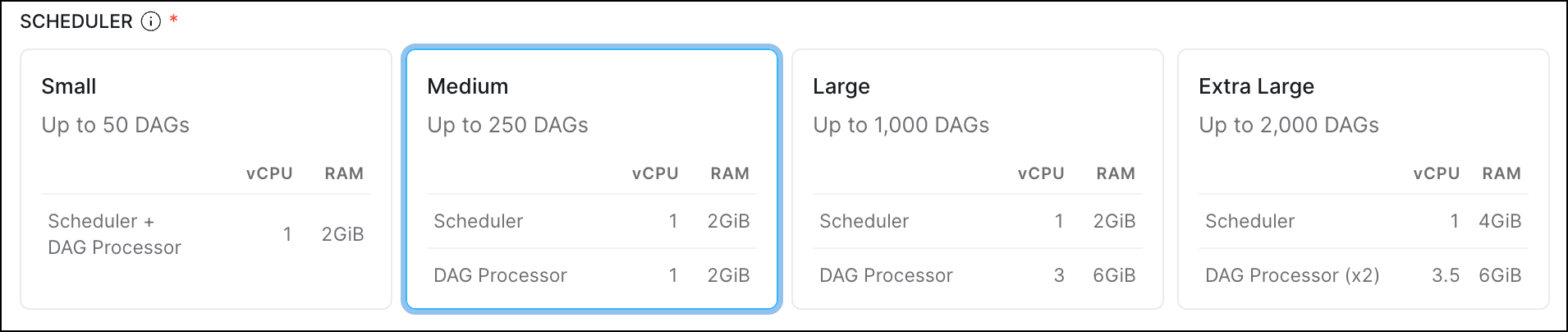
Astro UI improvements
Improved the navigation and design for managing clusters, editing settings, and accessing analytics for Organizations and Deployments.These changes include:- A new section in the main menu to include an Organization section with links to important resources for administering your Astro Organization. These include links to your Organization Settings, Organization Dashboards, and quick access to your cluster settings.
- A dedicated Deployment Analytics page in your detailed Deployment information, which now includes improvements to the tooltips and metrics visualization design. See Deployment metrics for more information about the available metrics.
- Your Deploy History now appears on the Overview page of your Deployment. See Deploy history for more information about how to view your code deploy history.
Create and manage Airflow variables with the Environment Manager
PreviewThis feature is in Preview.
Additional improvements
- You can now give Airflow Dataset Create and Delete permissions to custom roles. This capability is provided to Deployment Admin, Workspace Author, Workspace Operator, and Workspace Owner default roles. Previously only Workspace Owner and above had access to this permission set. See more information about User Permissions and Custom Deployment Roles.
- If your Astro Deployments run on AWS or GCP clusters, you can now see the Account ID of the clusters in the Cluster Details page in your Organization Settings.
- For Deployment alert emails, the sender now shows as Astro. It previously showed the sender as Postmaster.
- You can now see Deployment details while Astro creates your Deployment, where only the specific actions that are not available until after creation is complete are disabled.
Additional improvements
- Added the ability to specify Custom Workload Identity at Deployment creation time when creating an AWS Deployment.
- Improved the descriptions of default hibernation schedules in the UI.
- Added more detail in descriptions for code deploy failures in the Deploy History page.
Bug fixes
- Fixed an issue where you could not use global text search for dags in your Alerts.
- Resolved a problem where search query parameters might be deleted when using pagination.
Additional improvements
- Improved the descriptions of Deployment Health Alerts to provide more specific information about performance thresholds.
Bug fixes
- Fixed an issue where dag lists didn’t update when you switched Deployments in the Astro UI.
- Fixed a bug where the cursor would disappear while typing in certain fields in the Astro UI.
Customize labels on your metrics export
You can now add Key:Value pair labels to metrics that you export using the Universal Metrics Exporter. This allows you to tag and record metrics coming from specific Deployments or Workspaces. See Export metrics from Astro for more information.Additional improvements
- Added a new template demonstrating how to run dbt projects on Astro using Cosmos when you’re onboarding. See Get started on Astro to set up a trial account and try out a template.
Bug fixes
- Fixed an issue where a user could not bulk select alerts if they had different names but the same configurations.
New alerts for Deployment health incidents
LabsThis feature is in Labs. Please reach out to your account team to enable this feature.
- Improve alerting coverage beyond dag and task failures to address infrastructure-level incidents that are otherwise difficult to monitor.
- Proactively monitor Deployment health and take immediate remediation actions through email, Slack, and PagerDuty to reduce mean time to resolution.
- Share Deployment health visibility across teams.
Additional improvements
- Now, when you link directly to your Astro or Airflow UI, any link previews successfully have improved visuals and include metadata information.
- Improved the Astro Alerts UI to streamline creating notification channels and alerts across dags and Deployments. See Astro Alerts for setup information.
- Added an example Universal Metrics Export dashboard configuration file for Grafana Cloud. See Export metrics from Astro for setup instructions and Grafana example for a configuration example.
- Organization Dashboards are now generally available to Enterprise-tier customers. See View Organization Dashboards for more information.
Bug fixes
- Fixed a bug where the Astro UI would show an error in your Deploy History instead of your Runtime Version, if the Runtime version is
yanked. - Fixed an issue when creating an alert where you couldn’t select tasks with the same
task_idacross multiple selected dags.
Run your first dag on Astro with GitHub Integration
Now, when you first set up your Astro account, you can choose to connect your GitHub account and run a sample Astro project template and dag. Previously, to run your first dag on Astro, you needed to either download and use the Astro CLI or work with GitHub Actions. Now, the onboarding process allows you to customize your first experience with Astro to focus on your use case, whether that’s Business Operations, Generative AI, or learning Airflow, and set up a GitHub Integration to quickly clone and deploy the example dags. Try it now with Start Astro.Work with dbt projects on Astro
LabsThis feature is in Labs. Please reach out to your account team to enable this feature.
Additional improvements
- Improved how the GitHub Integration in the Astro UI links directly to the Astro Project in a GitHub repository.
- (Astro Hosted only) The customer managed workload identity setting for Deployments is now generally available. This allows you to grant Astro Deployments all of the permissions of an AWS IAM role. See Attach an IAM role to your Deployment for detailed information.
- The ability to deploy automatically from GitHub using the official Astro GitHub integration is now generally available. See Deploy code with GitHub for setup steps.
- Astro Runtime version 11 is now classified as Long Term Support (LTS). This means that instead of being supported until October 2024, Astro will support Runtime version 11 until October 2025. See the Astro Runtime maintenance and lifecycle schedule for more information, including information about restricted versions.
Bug fixes
- Fixed some bugs in the Astro UI for defining ephemeral storage to show storage limits, fix maximum pod size for storage, and add storage for default pod size.
Additional improvements
- Added the following metrics to Metrics Export:
- The new
airflow_executor_open_slots,airflow_dagrun_dependency-check, andairflow_dagrun_dependency-check.<dag_id>metrics allow you to collect metrics about your dags and executor status. - Monitor task execution with
kube_pod_container_resource_limits. This new metric enables you to track resource use against the configured limits so you can understand if task execution meets your configured CPU, memory, or storage limits for your Celery Workers or Kubernetes Executor and KubernetesPodOperator pods.
- The new
- Added new supporting documentation for the Astro Terraform Provider, including a Getting Started guide and code examples for common uses. Read Astro Terraform Provider for more information.
Bug fixes
- Fix an error where start times in the UI were different from actual dag run trigger times.
Additional improvements
- Fixed a bug that prevented adding a date input for a dag filter in the Astro UI.
Export metrics about your Astro Deployments to observability tools
This is feature is only available if you are on the Team tier or above. See Astro Plans and Pricing.
PreviewThis feature is in Preview.
Added ephemeral storage metrics to Astro Deployment Analytics
To assist you in determining the amount of custom ephemeral storage to configure for your workers and schedulers, you can now use Deployment Analytics to see relevant usage metrics. These include:- Ephemeral Storage Usage metric that shows a % of usage against the configured limit for your Celery Workers, KubernetesPodOperator, Kubernetes Executor, and Scheduler.
- Dynamic Y-axis Scaling to the Celery Worker, KPO/KE, and Scheduler Deployment analytics panel to include dynamic zooming.
Additional improvements
- The
Scheduler heartbeat not foundDeployment health incident is downgraded toWarningfromCritical.