

New Azure region available on Astro
You can now create dedicated clusters in the following Azure region:germanywestcentral
Centralized access management for Organization Owners
Organization Owners can now manage user and Team access to Deployments and Workspaces directly from Organization Settings, making it easier to update roles across your Astro Organization.Improved VPC networking for AWS dedicated clusters
Astro now uses a new VPC network architecture for AWS dedicated clusters that increases scalability and reduces IP exhaustion risk by assigning Kubernetes Pod IPs to a secondary CIDR range. Source Network Address Translation (SNAT) ensures all external traffic appears from the primary VPC subnet, allowing you to use smaller VPC ranges and simplify private networking. This architecture is now the default for new clusters created through the Astro UI and can be enabled for existing clusters in coordination with Astronomer support.New User Details page for centralized user management
You can now view and edit a member’s Organization, Workspace, and Deployment roles from a single place with the new User Details page. Team member names now link to this page, enabling centralized permission management. Team detail pages also allow you to manage Workspace and Deployment roles directly.Connect to any Git project in the Astro IDE
PreviewThis feature is in Preview.
Workspace-level environment variables
You can now create and manage environment variables at the Workspace level using the Environment Manager in the Astro UI. This enables you to define environment variables once and share them across multiple Deployments within a Workspace, with the ability to override values per Deployment.When you create an environment variable in the Environment Manager, Astro stores it in an Astronomer-hosted secrets manager and applies it to Deployments as Kubernetes Secrets. You can configure environment variables to automatically link to all current and future Deployments in your Workspace, or link them to specific Deployments individually.Key capabilities include:- Share environment variables across multiple Deployments within a Workspace
- Override environment variable values for individual Deployments
- Auto-link environment variables to all Deployments by default
- Use environment variables in branch-based deploys and PR previews
- Access workspace environment variables in ephemeral test Deployments started in Astro IDE
- Connect to secrets backends for secure, centralized management of sensitive values
Additional improvements
- In Astro Observe, you can now see the last run status for dags and tasks, including those that started but haven’t completed their run.
- Astro Observe now summarizes task failures by default for SLA breach events caused by a dag failure.
Triggerer chargeback and billing invoice UI
Beginning November 1, Astronomer enables chargebacks for customers who request additional compute for the Triggerer component. This update applies to all new organizations and most existing organizations. Additionally, a new Billing -> Invoices UI is available for all customers, providing improved visibility and transparency into billing details.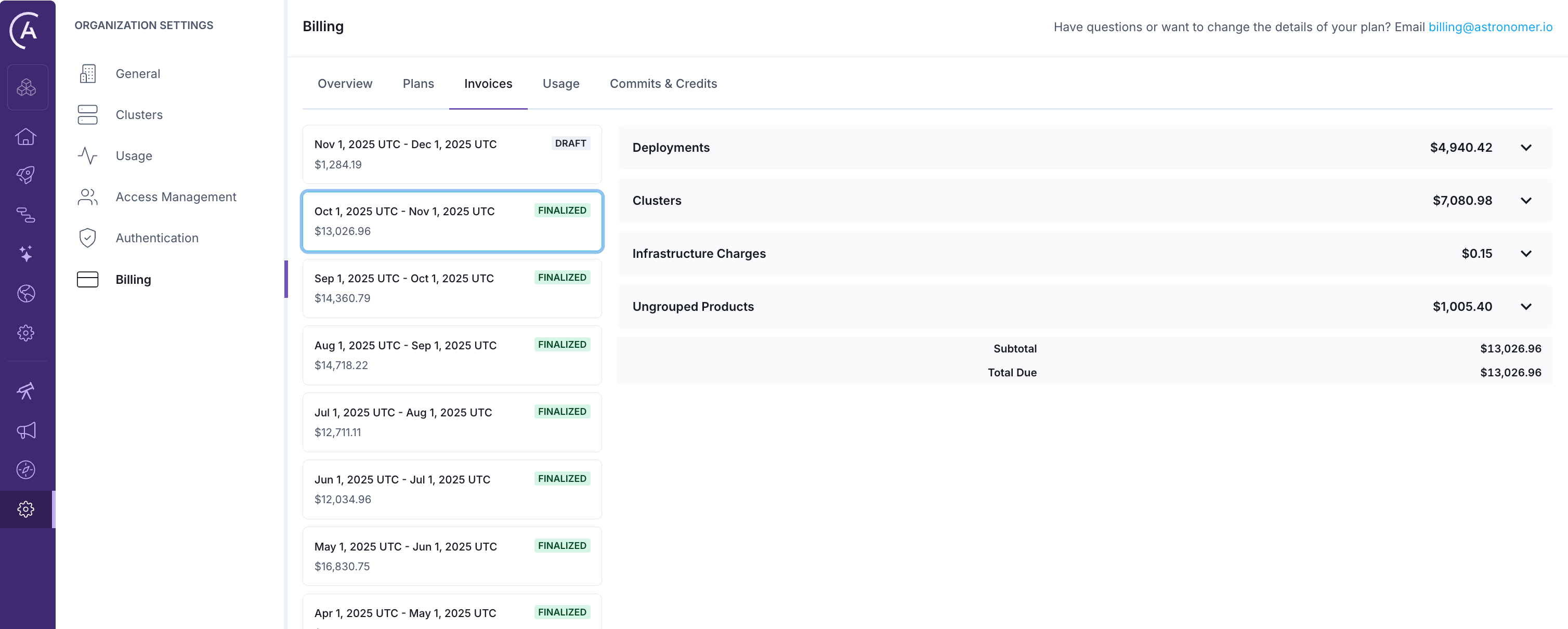
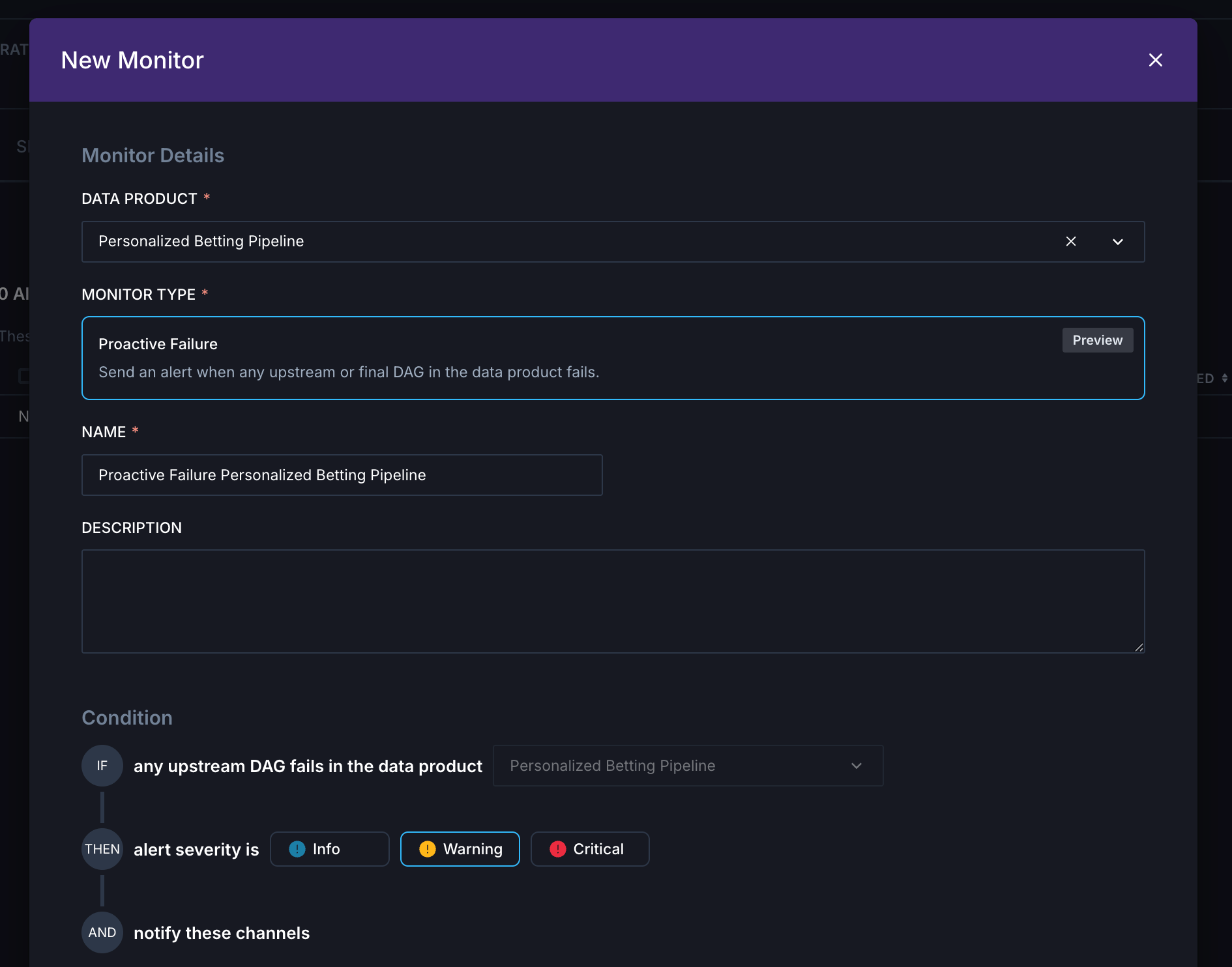
Proactive failure monitor for data products
PreviewThis feature is in Preview.
Additional improvements
- Astro Observe now supports searching for data products by name, making it easier to find relevant data products in a large team or Organization.
Enable or disable Astro AI Organization-wide
Astro now allows Organizations to self-service the enabling and disabling of AI features directly from Organization Settings. Organization Owners can access this new toggle in Organization Settings → Organization Details to manage whether Astro AI is enabled for the entire Organization. When Astro AI is disabled, all AI-driven features are turned off throughout the platform, including prompting features in the Astro IDE and AI Log Summaries in Astro Observe.Airflow 3 to Airflow 2 rollback support
Astro now supports rolling back Deployments from Airflow 3 to Airflow 2, expanding beyond the previous limitation of same-version rollbacks only. This enhancement provides a recovery path if you encounter critical issues after upgrading to Airflow 3. See the Airflow 3 to Airflow 2 rollback requirements for full Airflow 3 to Airflow 2 rollback requirements.Troubleshoot dag issues in Observe
You can now troubleshoot dag failures in Astro Observe directly from the Astro dag list. From any dag, click Open in Observe to view recent runs, or see upstream and downstream dependencies in lineage. Use Observe to investigate specific runs by viewing the event timeline of task execution and summarizing task failure logs, or assess the impact of a recent issue by seeing what data products contain the dag.To learn more about Observe and get access, click Observe in the Astro UI main navigation.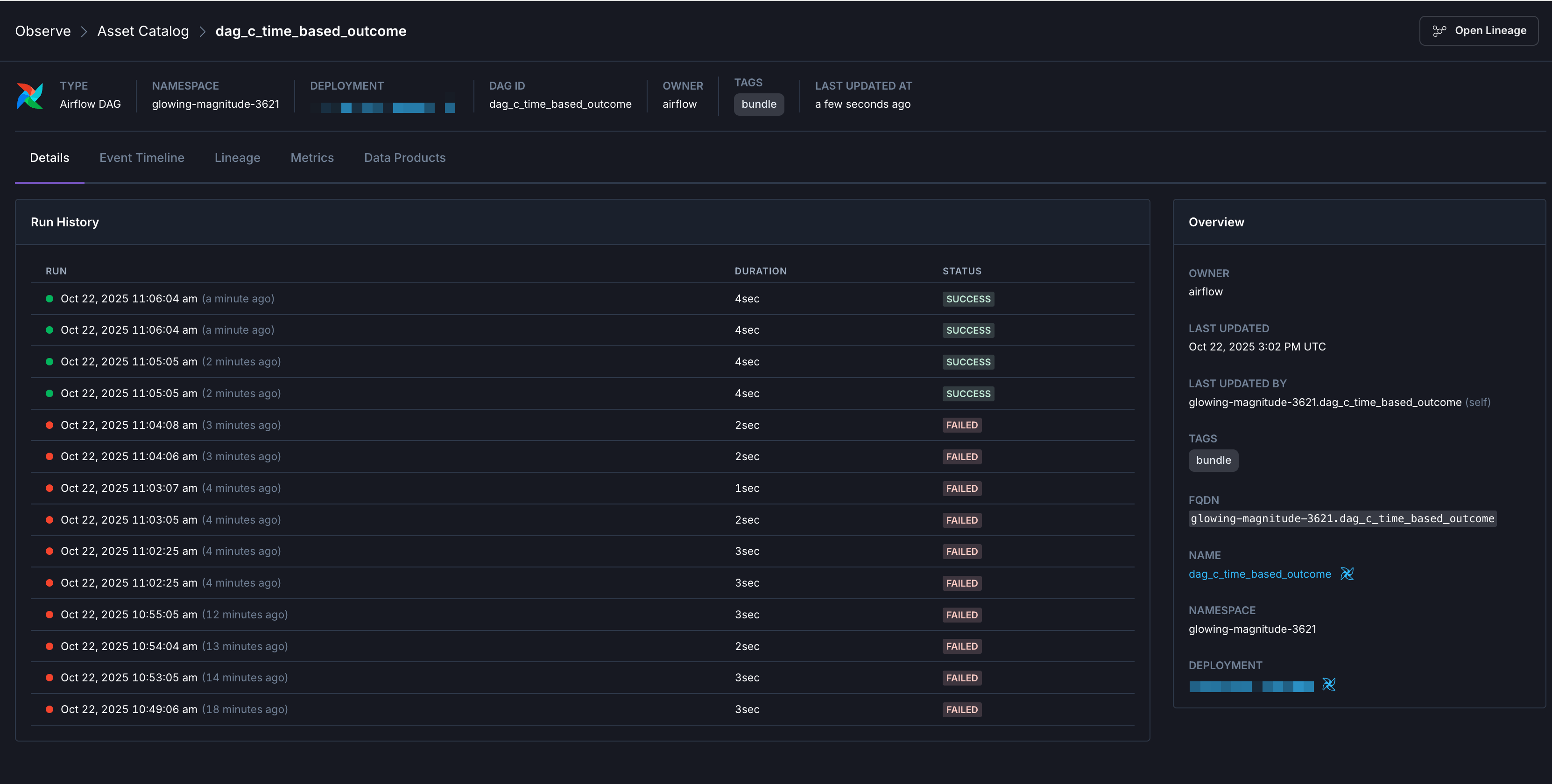
Additional improvements
- In Observe, you can now filter the dag and task timelines by Airflow run to investigate a specific run.
- In Observe, you can now see all data products an asset belongs to in the Data Products tab to assess downstream impacts.
Additional improvements
- Added the Never Wake wake schedule type, allowing Deployments to hibernate immediately and remain hibernated indefinitely.
- Improved configuration defaults for Airflow 3 API Servers to improve performance, reliability, and resource usage.
Quick start Deployment creation flow
A new Quick Start mode is available for Deployment creation in the Astro UI. This enhancement introduces template-based Deployment setup, enabling Deployment launches with a single click by selecting from predefined templates for Development, Pre-Production, and Production environments. Switch to advanced Custom Settings for full configuration control. This improvement streamlines the Deployment experience and ensures best-practice configurations are accessible by default. See Create a Deployment.Enhanced Wake Schedule section
The Wake Schedules section has been enhanced and now replaces the previous Hibernation Schedules. Wake Schedules are available when Development mode is enabled. Multiple schedules can be defined for each Deployment, supporting precise timezone, day, and hour targeting for efficient resource utilization and improved cost management. See Hibernate a Deployment.Enhanced Authentication for Metrics Export with SigV4Authorization
Universal Metrics Export now supports SigV4Authorization for AWS Deployments on dedicated clusters. You can use IAM role-based authentication to securely connect to Amazon Managed Prometheus without managing static credentials.In the Metrics Export configuration, select SigV4Authorization as your authentication type to enable secure, role-based access to your AWS observability services. Configure your AWS Role and Region, then copy the auto-generated trust policy from the new Trust Policies tab to complete the setup in your AWS account.This authentication method streamlines credential management while following AWS security best practices, making it easier to export Astro metrics to Amazon Managed Prometheus and other AWS-based observability tools.Additional improvements
- Updated the Observe Lineage Graph to center on expanded nodes when clicking to expand. Expanding a node now selects and centers the expanded node, improving usability for navigation with selected assets.
- Synced the run status highlighter’s date range control in Observe Lineage with the asset event timeline panel. The event timeline now reflects the highlighted date range selection.
- Added a Final Assets Only toggle on the Data Product Assets page, allowing you to easily filter and focus on key final assets.
- Removed the All DAGs option from DAG Timeliness alerts to prevent configuration errors and ensure alerts target specific dags.
- The IP Access List form now supports IPv6 addresses.
Bug fixes
- Fixed an issue in Observe Lineage Impact Analysis where the downstream asset list did not respect pagination page size.
- Fixed an issue in the Observe lineage view where entering an invalid date would crash the page.
- Fixed an issue in the Data Product Lineage Graph where the view would auto-recenter on a selected asset every 5 seconds.
Build pipelines with the Astro IDE
PreviewThis feature is in Preview.
Improved task eviction procedures
The Astro platform has improved how Kubernetes manages and responds to container out of memory (OOM) situations, specifically with Celery workers. Previously, a single task running on a Celery worker could cause an OOM issue and termination of the entire pod resulting in:- Killing all other tasks running on that container (zombie tasks)
- Losing task logs for both problematic tasks and all other tasks
Additional improvements
- Added support for creating the Remote Execution Agent Token with the Astro API, instead of exclusively through the Astro UI. See the Astro Platform API changelog, IAM API changelog, and the Remote Execution Agent docs.
Bug fixes
- Fixed a bug where Dag Processors would inherit the default of two parsing processes unless you manually set the environment variable
AIRFLOW__DAG_PROCESSOR__PARSING_PROCESSES.
Added Triggerer metrics to Deployment analytics
Added support for Airflow triggerer metrics and dashboards. You can now view pod count, CPU and memory usage per triggerer Pod, including maximum and average values, triggers per status over time, and running triggerers as timeseries in the Deployment Analytics dashboard. These metrics are also available for export with UME.Additional improvements
- Added asset search and enhanced navigation controls to the Observe Lineage Graph. You can now search for assets, center the graph on a selected asset, and benefit from improved zoom and pan controls.
- You can now see the Remote Execution Agent Version in the Remote Agents Table.
Bug fixes
- Fixed an issue in the Data Product form where editing an existing Data Product did not reliably load and display the current selections.
Additional improvements
- The Universal Metrics Exporter can now export the
kube_resourcequotainfrastructure metric. Additionally,scheduleranddag-processorare now included as containers in thekube_pod_container_resource_limitsmetric. - In Observe, all references to Graph are renamed to Lineage, including URLs and UI labels, for consistency.
Additional improvements
- Clusters and all sub-pages have been moved from the top-level navigation into Organization Settings.
Additional improvements
- You can now search for Deployments within the Connections, Metrics Exports, and Airflow Variables pages. This improves navigation and filtering for linked Deployments.
Bug fixes
- Fixed a bug where switching between executors caused Deployment updates to fail with a
default worker queue is requirederror. The required queue is now automatically recreated during executor changes. - Removed non-functional search bars from the Connections, Metrics Exports, and Airflow Variables pages. These will be reintroduced once backend support is implemented.
Enhanced Support Access
Enhanced Support Access is now enabled by default for all Organizations to ensure faster, more effective assistance from the Astronomer Support team. This feature grants Read-only Admin access to your Organization’s details, allowing the Astronomer Support team to troubleshoot issues in real time and provide premium-level support. Support does not have access to make any changes to your environment, and you can always view access activity through Audit logs. See Enhanced security access for more information.Additional improvements
- Added Astro API support for Airflow 3 Deployments. See Platform API changelog.
- Added a Applied Commit Or Credit ID column to the billing invoices table within Organization settings.
- You can now click rows in the Commits and Credits table to view detailed transaction history directly in the Astro UI.
- Improved the Dag list by adding status icons and enabling sorting by next run time, with the default showing the next-to-run dag at the top.
Bug fixes
- Fixed a bug in where you could not update the Values field for Astro Alerts.
- Fixed a bug where the Observe Lineage Graph failed to render nodes.
Additional improvements
- In Runtime 11.15.0 and later, Kubernetes executor workers no longer fail immediately on
ErrImagePullevents. Instead, they retry pulling the image until thetask_queued_timeoutis reached. If the image pull still fails, the task is requeued. - Astro now shows an error page with a redirect option when navigating to deleted or non-existent resources.
Bug fixes
- Fixed a bug where Remote Deployments could be created and updated with a non-small scheduler size.
Bug fixes
- Fixed a bug where characters were lost when typing quickly in the Filter by Dag Name input field.
- Fixed an issue in Astro Executor where logs for previous task attempts on Hosted execution mode Deployments were not retrievable.
Improved resilience of Airflow UI and API for non-HA Deployments
Improved reliability for non-HA Deployments by ensuring there’s minimal traffic disruption during Pod restarts. With better coordination between shutdown and startup, traffic continues to flow even during infrastructure events like evictions, significantly improving reliability for non-HA customers. These enhancements apply to interactions between both your dags and the Airflow UI and your dags and the API, leading to a 95% availability improvement.Additional improvements
- Updated the Azure Workload Identity input validation patterns to match the officially allowed characters.
Bug fixes
- Fixed a bug in Observe where the namespace for OpenLineageDatasets in the assets view was incorrectly showing the namespace of the Deployment instead of the namespace of the OpenLineageDataset.
- Fixed a bug where the Bucket URL option for Azure Remote Deployments was not working as expected.
- Fixed a bug that prevented scrolling in the Create/Update Connections modal.
Metrics Exports logs now available in Astro
You can now view error logs for Metrics Exports connections at both the Deployment and Workspace level in Astro to quickly identify and troubleshoot connection issues. For common errors, a Resolution column provides guidance on how to resolve them. See Metrics Exports error logs for more information.Additional improvements
- You can now create Dedicated clusters in
europe-west6on GCP.
Bug fixes
- Fixed scheduler size default for Remote Execution Deployments in the Astro UI. Previously, when switching to the Remote Execution mode after selecting the Celery or Kubernetes executor, the scheduler size incorrectly remained set to
medium. The scheduler size now correctly defaults tosmallwhen Remote Execution mode is selected.
New AWS regions available on Astro
You can now create dedicated clusters in the following AWS regions:ca-central-1
Additional improvements
- Improved Deployment creation experience so that when you change the Executor it does not reset Worker Queues values.
Bug fixes
- Fixed a bug where Astro Executor Deployments could assign multiple task allocations if multiple identical dag run IDs exist for multiple dags.
- Fixed a bug where the incorrect auth manager config was set, breaking the webserver for some Runtime versions.
- Fixed a bug in the Astro UI where back buttons didn’t behave as expected. Now, if you make page filtering changes, the back button no longer reverts those change. Instead, it goes to the previous entire page.
Bug fixes
-
Fixed a bug in the Astro Observe Asset Catalog where namespaces would show up as
n/aif Observe could not find the respective Hosted Deployment. - Fixed a bug where the Open Airflow button on the Deployment Details page was clickable even if Astro was still creating the Deployment.
Additional improvements
- Added the ability to switch between a table view for CPU Usage Per Pod and Memory Usage Per Pod for Deployment analytics.
Bug fixes
- Fixed a bug where the Kubernetes Executor Deployments ignored the Airflow logging level for the Airflow Scheduler.
- Fixed a bug where the Astro UI truncated displayed values for the Airflow Variable and the Airflow Override Variable.
New AWS regions available for Standard clusters
You can now create Deployments on a Standard cluster in the following AWS regions:eu-west-1
Bug fixes
- Fixed a bug where Airflow Asset linking was broken in Observe.
- Fixed a bug in the Deployment Analytics Pod metrics charts where utilisation appeared to be greater than 100% of the resource limit.
- Fixed a bug where the Code tab in the Airflow UI on Hosted Execution mode Deployments showed a Remote Execution warning instead of the source code.
Introducing Airflow 3 on Astro
Apache Airflow 3 introduces a suite of new features such as dag versioning, event-driven scheduling, advanced inference execution, a redesigned modern UI, and high-performance backfills. A new distributed architecture decouples task execution from direct database connections, enhancing security and operational agility for your mission-critical data pipelines.Astro delivers Apache Airflow 3 capabilities on Day Zero in an enterprise-ready, fully managed, secure and auto-scaling platform, supported by Airflow experts and code committers.To support your Airflow 3 work on Astro, see the Astro CLI 1.34 release notes, Runtime 3.0-1 release notes, and Airflow 3 blog post.See Upgrade to Airflow 3 for steps to upgrade your Astro project from Apache Airflow 2 to Apache Airflow 3.Remote Execution Mode on Astro
This is feature is only available if you are on the Enterprise tier or above. See Astro Plans and Pricing.
Astro Executor
The Astro Executor is an exclusive feature on Astro that’s optimized for throughput and latency, ensuring your data workflows perform efficiently. Combined with straightforward in-place upgrades, you get to experience Airflow 3 benefits with Astro’s proven reliability.Dag Versioning on Astro
Airflow 3’s dag versioning ensures that each pipeline run references its exact code snapshot, enabling complete historical traceability.On Astro Hosted Deployments, dag versioning is handled seamlessly and integrated with your existing deploy mechanisms and requires no additional configuration.See Dag versioning.Additional improvements
- Code deployment architecture has been simplified for improved reliability.
- Added the new custom Deployment role template, Observe Ingest. This allows you to create Deployment API Tokens scoped to only ingest OpenLineage observability data.
Deprecated dag details view
The dag details view replicated information readily available in the Airflow UI. Deprecating the dag details view enables Astronomer to invest in enhancing the core Airflow experience for all users.Additional improvements
- You can now see a breakdown of task metrics such as Failed Task Runs, Task Retry Rate, and Long-Running Tasks on the Observe Health Dashboard.
New Azure region available for Dedicated clusters
You can now create Deployments on a Dedicated cluster in the following Azure region:uaenorth
Additional improvements
- Updated the Observe Timeline filters to only show entities that are relevant to what is currently displayed on the timeline.
- In the Observe Health dashboard, added links to entity names in the Alerts Triggered and SLAs Missed sections.
- Removed the Historical Landing and Current Lookback charts from the Data Product Overview tab. A revision of this page is in the works.
Additional improvements
- Combined the Sent and Failed counts of the Triggered Alerts section in the Observe Health dashboard into a summed Triggered count.
- The High Availability toggle is now in the Basic section of Deployment details. Astronomer recommends enabling High Availability for production Deployments.
Bug fixes
- Fixed a bug where the
deployment.getpermission wasn’t being enforced when accessing Environment Variables for Deployments. - Fixed a bug where
AIRFLOW__SCHEDULER__TASK_QUEUED_TIMEOUTwas not respected in user Deployment configurations. - Fixed an issue where upon selecting a value from the Event Type Status selector, you would not be able to close the menu by clicking outside of the menu.
Break down cost per task for expensive dags in Observe
In Astro Observe, you can now see the cost per task (in Snowflake credits) of your most expensive dags. Hover over any dag in the Most Expensive DAGs graph to see a dynamic view of the most expensive tasks in that dag. Click into any task to drill down into cost metrics over time and begin optimizing to save costs.To learn more about Observe and get access, click Observe in the Astro UI main navigation.Additional improvements
- In Astro Observe, added an SLA Consumption Metric in the Alerts & SLAs section.
- In Astro Observe, the Event Timeline list now uses Entity Name instead of ID if the Name is available.
Alert rules enhancements
For dag and task-level Alerts, you can now specify which dags and tasks the alert applies to by matching against a string. Use matching operators such asis one of for exact matches and contains for partial matches within a dag or task ID. You can also select All Dags for all dags in a Deployment and All Tasks for all tasks in the defined dag(s). See Astro alerts for more information.Data Pipelines Health Dashboard improvements in Astro Observe
In Astro Observe, the Data Pipelines Health Overview dashboard now supports drilling down into Cost Management and Alert Graphs. In Cost Management section, click on the most expensive dags or Tasks to see their underlying costs over time to pinpoint costly issues and understand where to optimize.The Alerts graph now shows a list of alerts that fired in the reporting window and links to the alert’s notification history. For example, to investigate an SLA breach alert that fired far more often than expected, you can go to the alert’s notification history to pinpoint the specific time range when the alert failed.To learn more about Observe and get access, click Observe in the Astro UI main navigation.Additional improvements
- In Astro Observe, the Lineage graph now displays a detail view of individual assets. Click on any asset (like an Airflow task or dataset) to open the detail view, which includes metadata like a task’s operator class, a link to open the asset in Airflow, and the reason for inclusion in the lineage graph.
Cloud IDE is now deprecated
The Cloud IDE has been officially deprecated. Stay tuned for a next-generation dag authoring experience!Ask Astro enhancements
- You can now log in to Ask Astro using your existing Astro account or create a new one to submit private questions.
- Answers are now streamed back in real time, making the experience quicker and more responsive.
- A specialized dag generation experience has been introduced.
Additional improvements
- Added the ability to work with Astro Alerts and their Notification Channels through the Astro API. See Astro API changelog for more information.
- Added an Astro Observe asset sidebar so you can preview an asset’s metadata without leaving the graph.
- You can now choose the Team plan in addition to the Developer plan for monthly “pay-as-you-go” billing. This update gives you the ability to self-service to the plan that best suits your needs.
- Updated the default scheduler size for Deployments to
mediumso that new Deployments include a separate Dag processor by default.
Bug fixes
- Fixed a bug where metric charts failed to populate for queues with long names.
- Fixed a bug where the Deployment connections table only showed a maximum of 20 items.
- Fixed a bug where changing tabs in Data Product and Asset Catalog Metrics would reset the currently selected time range.
- Fixed a bug where environment variable secrets would toggle when the label was clicked.
Astro Observe now generally available
Observe is Astronomer’s comprehensive observability solution for Apache Airflow® that provides visibility into the health and performance of your data pipelines. Using Observe, you can create data products to monitor performance of key data assets and set SLAs that alert on data product timeliness and freshness. With this GA release, you can now:- Visualize real-time health and cost metrics across your data pipelines in a single place with the pipeline health dashboard
- Connect Snowflake cost trends to reliability metrics to pinpoint inefficiencies across your dags and data products
- Reduce mean time to resolution with targeted root cause analysis that identifies upstream issues that caused SLA breaches or failures
- Understand failures at a glance with AI Log Summaries, which provide a human-readable explanation of Airflow task logs, including what went wrong, where to look in order to fix it, and how to prevent it from happening again
- Proactively mitigate risks to data product health and increase alerting coverage with Observe Insights
Notification History now available for Astro Alerts
You can now see a historical log of all previously triggered Alerts for your Organization, and filter them based on status, time range, notification channel, and the Alert that triggered the notification. This lets you see a historical view of issues across deployments and data products, like SLA breaches, dag and task failures, and Deployment health incidents.To see the history of all alerts across your Organization, click Notification History in the Alerting section of the navigation. To see the history for a particular alert, go to the Alerts page, where you can see the number of times an alert was sent or failed to send. Click on the number in the Sent column to see alert notifications sent for that alert.Bug fixes
- Fixed a bug that disabled editing of all existing environment variables instead of just existing secrets.
Bug fixes
- Fixed a bug affecting the Deployment environment variables create and update form in the Astro UI.
- Fixed a bug that caused the self-healing worker to prematurely kill Deployments when the dag downloader took a longer time than expected to start working. Now, Astro has updated logic that accounts for slow starting workers for Self-Healing Workers.
High Availability Deployments now run two webservers by default
High Availability Deployments in Astro Hosted now run two webservers by default, improving Airflow API availability during events like node consolidation and image deploys.Bug fixes
- Fixed a SCIM integration issue that prevented users from pushing all their teams to Astro when an Organization had more than 100 teams.
Region based pricing now visible in Billing Dashboard
Now, when you view your Invoices, you can see the region your cluster is based in and the cloud provider. See Manage Astro billing.New Azure regions available for Standard clusters
You can now create deployments on a Standard cluster in the following Azure regions:australiaeast
Additional improvements
- Organized Alert types into categories instead of displayed in one list, so you can more easily find a particular alert within its type.