

View scheduler error logs from the Astro UI
The new Logs tab in the Astro UI shows scheduler error and warning logs for all Deployments in your Workspace. When you select a Deployment in this menu, all error logs generated over the last 30 minutes appear in the UI.To access logs directly for a given Deployment, click the new Logs button on the Deployment’s page or in the Deployments table.For more information on how to view logs, read View logs.Bug fixes
Fixed various bugs in the Astro UI to better handle nulls and unknowns in Deployment metricsNew “Usage” tab in the Astro UI
Total task volume for your Organization is now available in a new Usage tab in the Astro UI. Astro is priced based on successful task runs, so this view can help you monitor both Astro cost as well as Airflow usage in aggregate and between Deployments.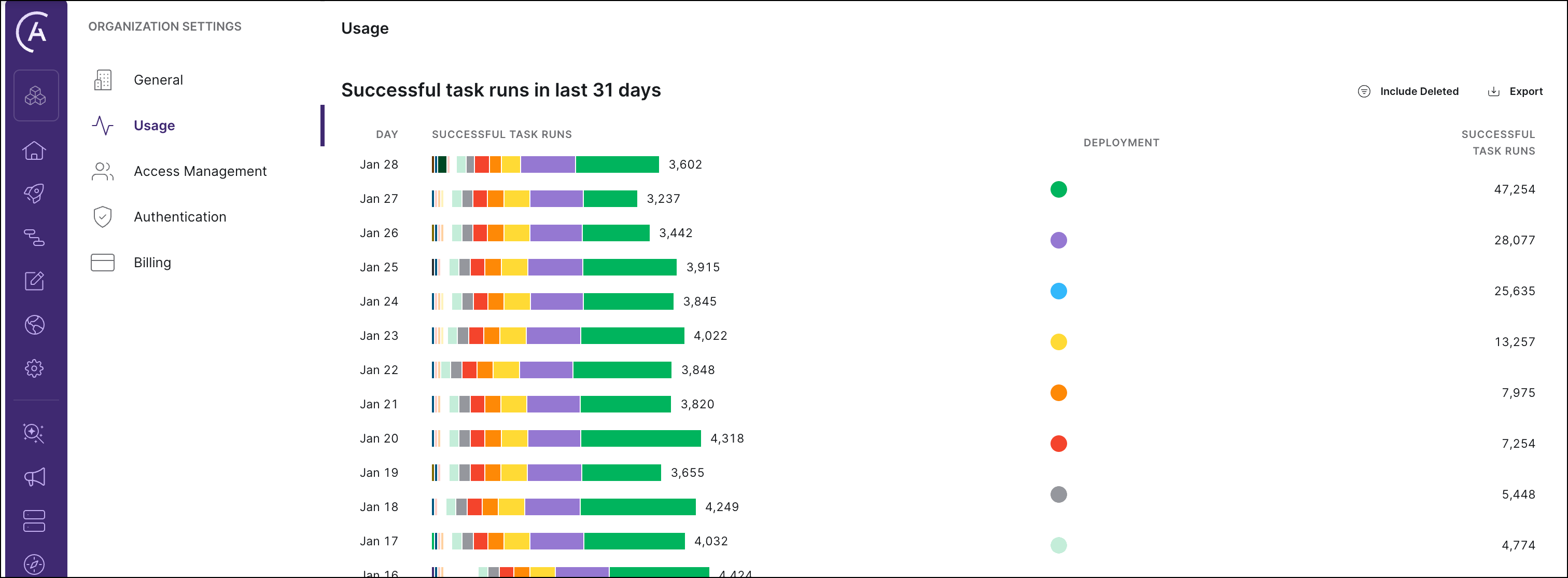
New AWS regions available
You can now create new clusters in:us-west-1ap-northeast-1ap-southeast-1ap-northeast-2ap-southeast-2ap-south-1us-west-1us-west-2
Additional improvements
- You can now see your Deployment’s Namespace in the Deployments menu and on the Deployment information screen in the Astro UI. Namespace is a required argument to run tasks with the KubernetesPodOperator. It is also required to submit an issue to Astronomer support.
- The Astro UI now shows a warning if you attempt to exit Environment Variable configuration without saving your changes.
- A Deployment’s health status is now based on the health of both the Airflow webserver and scheduler. Previously, a Deployment’s health status was only based on the health of the webserver. Now, the Astro UI will show that your Deployment is “Healthy” only if both components are running as expected.
Bug fixes
- The Astro UI now has error handling for attempts to access a Deployment that does not exist.
- If you attempt to modify an existing secret environment variable, the Value field is now blank instead of showing hidden characters.
Data plane improvements
- Amazon EBS volumes have been upgraded from gp2 to gp3 for improved scale and performance.
- EBS volumes and S3 buckets are now encrypted by default.
- The ability to enable public access to any Amazon S3 bucket on an Astro data plane is now blocked per a new AWS account policy. Previously, public access was disabled by default but could be overridden by a user creating a new S3 bucket with public access enabled. This AWS account policy could be overridden by AWS account owners, but Astronomer strongly recommends against doing so.
Secret environment variables
You can now set secret environment variables via the Astro UI. The values of secret environment variables are hidden from all users in your Workspace, making them ideal for storing sensitive information related to your Astro projects.For more information, read Set environment variables via the Astro UI.Additional improvements
- You can now create new clusters in AWS
sa-east-1. - Extra whitespace at the end of any environment variable that is set via the Astro UI is now automatically removed to ensure the variable is passed correctly.
Deployment metrics dashboard
In the Astro UI, your Deployment pages now show high-level metrics for Deployment health and performance over the past 24 hours.
Bug fixes
- Resolved a security vulnerability by setting
AIRFLOW__WEBSERVER__COOKIE_SECURE=Trueas a global environment variable
Bug fixes
- Fixed an issue where a new user could not exit the Astro UI “Welcome” screen if they hadn’t yet been invited to a Workspace
Cloud UI redesign
The Astro UI has been redesigned so that you can more intuitively manage Organizations, Workspaces, and your user profile.To start, the homepage is now a global view. From here, you can now see all Workspaces that you have access to, as well as information and settings related to your Organization: a collection of specific users, teams, and Workspaces. Many features related to Organizations are coming soon, but the UI now better represents how Organizations are structured and what you can do with them in the future.You can now also select specific Workspaces to work in. When you click in to a Workspace, you’ll notice the left menu bar is now entirely dedicated to Workspace actions:- The Rocket icon brings you to the Deployments menu.
- The People icon brings you to the Workspace Access menu.
- The Gear icon brings you to the Workspace Settings menu.
Additional improvements
- You can now create new clusters in
us-east-2andca-central-1. - In the Deployment detail page, Astro Runtime now shows the version of Apache Airflow that the Deployment’s Astro Runtime version is based on.
- You can now create or modify an existing Astro cluster to run any size of the
t2,t3,m5, orm5dAWS EC2 instances.
Bug fixes
- Fixed an issue where a new Deployment’s health status did not update unless you refreshed the Astro UI
Bug fixes
- Fixed an issue where you couldn’t push code to Astro with a Deployment API key via a CI/CD process
- Fixed an issue where you couldn’t update or delete an API key after creating it
Additional improvements
- When deleting a Deployment via the UI, you now have to type the name of the Deployment in order to confirm its deletion.
Bug fixes
- Fixed an issue where you could not access Airflow’s REST API with a Deployment API key
- Fixed an issue where calling the
imageDeployAPI mutation with a Deployment API key would result in an error
Additional improvements
- When creating a new Deployment, you can now select only the latest patch version for each major version of Astro Runtime.
- When creating a new Deployment in the Astro UI, the cluster is pre-selected if there is only one cluster available.
- The name of your Astro Deployment now appears on the main dags view of the Airflow UI.
- You can now see the health status for each Deployment in your Workspace on the table view of the Deployments page in the Astro UI.
- In the Astro UI, you can now access the Airflow UI for Deployments via the Deployments page’s card view.
- The Astro UI now saves your color mode preference.
Additional improvements
- In the Astro UI, the Open Airflow button is now disabled until the Airflow UI of the Deployment is available.
- Workspace Admins can now edit user permissions and remove users within a given Workspace.
This release introduces a breaking change to code deploys via the Astro CLI. Starting on September 28, you must upgrade to v1.0.0+ of the CLI to deploy code to Astro. CI/CD processes enabled by Deployment API keys will continue to work and will not be affected. For more information, read the CLI release notes.
Additional improvements
-
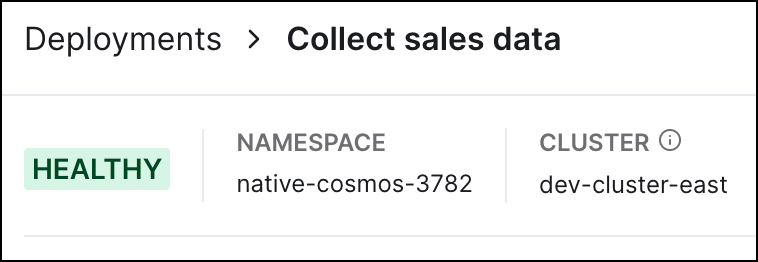
In the Astro UI, a new element on the Deployment information screen shows the health status of a Deployment. Currently, a Deployment is considered unhealthy if the Airflow webserver is not running and the Airflow UI is not available:
-
The documentation home for Astro has been moved to
www.astronomer.io/docs, and you no longer need a password to access the page.
Bug fixes
- The Astro UI now correctly renders a Deployment’s running version of Astro Runtime.
Support for Deployment API keys
Astro now officially supports Deployment API keys, which you can use to automate code pushes to Astro and integrate your environment with a CI/CD tool such as GitHub Actions. For more information on creating and managing Deployment API keys, see Deployment API keys. For more information on using Deployment API keys to programmatically deploy code, see CI/CD. Support for making requests to Airflow’s REST API using API keys is coming soon.Bug fixes
- Added new protections to prevent S3 remote logging connections from breaking
- Fixed an issue where environment variables with extra spaces could break a Deployment
- Fixed an issue where Deployments would occasionally persist after being deleted via the UI
- In the UI, the Organization tab in Settings is now hidden from non-admin users
- In the UI, the table view of Deployments no longer shows patch information in a Deployment’s Version value
Additional improvements
- You can now remain authenticated to Astro across multiple active browser tabs. For example, if your session expires and you re-authenticate to Astro on one tab, all other tabs running Astro will be automatically updated without refreshing.
- If you try to access a given page on Astro while unauthenticated and reach the login screen, logging in now brings you to the original page you requested.
Bug fixes
- Fixed an issue where an incorrect total number of team members would appear in the People tab
Support for the Airflow REST API
You can now programmatically trigger dags and update your Deployments on Astro by making requests to Airflow’s REST API. Currently this feature works only with temporary tokens, which are available atcloud.astronomer.io/token. Support for Deployment API keys is coming soon. For more information on using this feature, read Airflow API.Additional improvements
- Set
AIRFLOW_HOME = 'usr/local/airflow'as a permanent global environment variable - In the Astro UI, long environment variable keys and values now wrap to fit the screen
- Added links for the Astronomer Registry and certification courses to the left-hand navbar
- Moved the Teams and People tabs into the Settings page of the UI
- Added Cluster information to the metadata section of a Deployment’s information page in the UI
- Renamed various UI elements to better represent their functionality
- Increased the maximum Worker Termination Grace Period from 600 minutes (10 hours) to 1440 minutes (24 hours)
Bug fixes
- The left-hand navbar in the UI is no longer cut off when minimized on smaller screens
- Fixed an issue where you could not delete a Workspace via the UI
- Fixed an issue where expired tokens would occasionally appear on
cloud.astronomer.io/token - Fixed an issue where the UI would initially load an inaccurate number of team members on the Access page
- Fixed alphabetical sorting by name in the People tab in the UI
- Removed placeholder columns from various tables in the UI
Additional improvements
- Informational tooltips are now available on the New Deployment page.
Bug fixes
- Fixed an issue where adding a user to a Workspace and then deleting the user from Astro made it impossible to create new Deployments in that Workspace
- Improved error handling in the Airflow UI in cases where a user does not exist or does not have permission to view a Deployment
Improvements
- Increased the limit of Worker Resources from 30 AU to 175 AU (17.5 CPU, 65.625 GiB RAM). If your tasks require this many resources, reach out to us to make sure that your cluster is sized appropriately
- Collapsed the People and Teams tabs on the left-hand navigation bar into a single Access tab
- Added a Cluster field to the Deployments tab in the Astro UI. Now, you can reference which cluster each of your Deployments is in
- Replaced our white “A” favicon to one that supports color mode
- Informational tooltips are now available in Deployment Configuration
Bug fixes
- Fixed an issue where a deleted user could not sign up to Astro again
- Removed Deployment-level user roles from the Astro UI. Support for them coming soon
- Fixed an issue where a newly created Deployment wouldn’t show up on the list of Deployments in the Workspace