

Customer managed workload identity for AWS
PreviewThis feature is in Preview.
- Re-use or share a customer managed identity across many Deployments, either ephemeral or static.
- Leverage existing identities when migrating from MWAA or open source Airflow environments
Self-healing workers automatically address stuck queued tasks
A new improvement to the Astro Data Plane now automatically identifies when Celery workers are online and healthy, but not actually processing new tasks. When this happens, it looks like many tasks are stuck in aqueued state. With this new feature, you will experience a lower frequency of tasks stuck in a queued state, which causes performance and reliability issues for your Airflow implementation.Self-healing workers use the following process:- It first identifies workers that both have tasks stuck in a
queuedstate for an extensive time period and are in Deployments where the concurrency available means that tasks should not be queued. - The healer then kills catatonic workers that are not running tasks or shifts workers that are still running tasks into a warm shutdown period.
- After the catatonic worker is shut down, a new healthy, worker comes online and resumes tasks.
Additional Improvements
- Improved the formatting for how IP addresses are listed in the Astro UI to make it easier to copy and paste them.
Bug fixes
europe-west6is no longer available as a region for dedicated clusters on GCP.
Additional Improvements
- Moved the Environment variable tab in Deployment Settings to the Environment tab, and renamed it to Environment Variables. This helps disambiguate between Environment Variables and Airflow Variables in the Astro UI. Refer to Manage environment variables for more information about the different methods to set up and manage Environment variables.
Bug fixes
- Fixed a bug where a duplicate Customer managed identity option displayed when configuring Deployment settings.
Restrict Astro access to specific IP Address ranges with IP Access list
This is feature is only available if you are on the Enterprise tier or above. See Astro Plans and Pricing.
Additional improvements
- When using the GitHub integration, you can now retry a failed deploy or trigger a Git deploy directly from your Deployment settings page in the Astro UI. See GitHub Integration for more information.
- Deployments at the end of an Astro trial now automatically hibernate and are not immediately deleted. If your trial has ended, add a credit card number to your Organization to access your Workspaces and wake your hibernating Deployment. While in hibernation, Deployment settings and configurations are preserved. If you don’t enter a payment method within 30 days, your hibernating Deployments and all corresponding data are deleted. See Start a trial for more information.
- The ability to create, update, and delete Deployment API tokens is restricted to users with the Workspace Owner role. Read Workspace user permissions for more information.
Bug fixes
- Fixed an issue where the Organization Settings Dashboard failed to load correctly.
API keys are no longer supported
As of June 1, 2024, Deployment API keys are no longer supported. Replace your API keys with Deployment API tokens, confirm successful operation with your API tokens, and then delete your API keys.Configure ephemeral storage on worker Pods
PreviewThis feature is in Preview.
- Celery worker: 10 GiB minimum by default. 100 GiB maximum.
- Kubernetes executor/ Kubernetes pod operator: 0.25 GiB minimum by default. 100 GiB maximum.
Automate Airflow, resource, and infrastucture management with the Astro Terraform Provider
PreviewThis feature is in Preview.
Additional improvements
- The Astro UI now validates cron expressions for development Deployment hibernation schedules and shows commonly used hibernation schedules that you can enable or disable. Refer to Create a hibernation schedule for more information.
- If you don’t already have a GitHub repository, you can now create one when you authorize the GitHub Integration from the Astro UI. Previously, you could only connect Astro to existing repositories.
Bug fixes
- Fixed an issue where you could not use Airflow connection testing with Azure Managed Identities on Astro.
Additional improvements
- Dedicated clusters are now available only to Team tier customers and above.
- Added a centralized docs reference page that lists all open source Apache Airflow provider packages and their versions for each Astro Runtime version. See Provider package reference.
Bug fixes
- Fixed an issue where you could make changes to clusters and Deployments on an inactive Organization.
- The default storage resources for the Kubernetes executor and KubernetesPodOperator Pods are now enforced with
0.25Giinstead of10Giin some cases. You can still customize the resource allocation for Kubernetes pods depending on your needs. See Configure Kubernetes Pod Resources
The Astro GitHub integration is now in Preview
PreviewThis feature is in Preview.
Bug fixes
- Fixed an issue where users with custom roles could see roles that could not be assigned in the Astro UI.
Additional improvements
- Airflow connections that you configure through the Astro UI environment manager are now mounted to Deployment schedulers, meaning that scheduler processes can now make use of these Airflow connections.
Bug fixes
- Fixed an issue where you couldn’t update users who were added through SCIM but didn’t belong to an Organization.
- Fixed an issue where a user with a custom role could create API Tokens, users, or teams with greater permissions than their own.
Updates to address ranges for dedicated clusters on Google Cloud Provider
Astro on GCP Dedicated Clusters uses source network address translation (SNAT) that performs many-to-one IP address translations for connections to your data sources and defaults secondary ranges to RFC 6598 address space (non-standard Private IP addresses), to minimize the risk and concern with IP overlap and exhaustion. Your target data sources will see connections from Astro using the VPC Subnet Range when using private networking, like VPC Peering or VPN. If you want to configure private connectivity, ensure the default subnet and peering ranges don’t overlap with your target data source network when you’re creating your dedicated cluster. See Create a dedicated Astro cluster for more details.Improvements to Astro performance
As part of continued investment in the reliability, performance, and scalability of Astro, Astronomer is embarking on a migration of public and private image registries. Astro Runtime clusters will benefit from more performant, globally distributed and geo-replicated image registries, with built-in registry resilience if a regional outage occurs. This is in addition to the previous release of the registry cache local to every Astro cluster.No end user or task runtime change or impact is expected as part of the backend cutover during the week of May 6th, 2024.Additional improvements
- You can no longer create Deployments using Astro Runtime versions marked as
yankedinhttps://updates.astronomer.io/astronomer-runtime, even if your Organization has enabled creating Deployments with deprecated Runtime versions. These versions of the Astro Runtime have known issues and should not be used. For more information, see Restricted Runtime Versions.
Bug fixes
- Fixed a bug where multiple users could not access Organization Dashboards simultaneously.
Deploy automatically from GitHub using the official Astro GitHub integration
LabsThis feature is in Labs. Please reach out to your account team to enable this feature.
- Allows you to enforce software development best practices without maintaining custom CI/CD scripts.
- Enables developers to iterate on dag code quickly.
- Shows Git metadata directly in the Astro UI, including Git commit descriptions.
- Gives you greater visibility into the status and detailed logs of an individual deploy.
Restrict a custom Deployment role to specific Workspaces
You can now restrict the use of a custom Deployment role to specific Workspaces. Use Workspace role restriction when some Workspaces in your Organization have different requirements for how users interact with Deployments. See Restrict a custom Deployment role to specific Workspaces for setup steps.Additional improvements
- The custom Deployment roles feature is now generally available.
- You can now promote a development Deployment to a production Deployment by switching off the Development Mode toggle in the Deployment’s configuration.
-
Workspace Members can now see and use custom Airflow menu items. To give a custom role this permission, you can add
deployment.airflow.customMenu.getto the role’s permissions list. This permission works only on Deployments running Astro Runtime 9 or later. Note that you might have to modify the code for your menu item plugins to make them work on Astro. See Appbuilder menu items for more information. - You can now filter the Workspaces and clusters lists in the Astro UI by name.
Bug fixes
- To improve the reliability of data lineage for customers who leverage it, data lineage is now a private preview feature that can be enabled upon request. To reenable data lineage for an Astro Organization, reach out to your account team.
Bug fixes
- Fixed an issue where you couldn’t grant a custom Deployment role to a Deployment API token using the Astro API.
Additional improvements
- You can now manage custom Deployment roles using the Astro API.
- Improved the time it takes to load Deployment analytics in the Astro UI.
- You can now view info-level incidents from the Deployment health status indicator in the Astro UI.
- It is now possible for workers to use up to 6400 CPUs and 12800 GiB of memory on a single Deployment.
Bug fixes
- Fixed an issue where you couldn’t configure boolean values for Airflow connections in the Astro UI.
- Fixed an issue where Airflow connections configured through the Astro UI did not work with deferrable tasks.
Additional improvements
- Deployment health incidents are now generally available.
- Deployment hibernation is now in public preview.
Bug fixes
- Fixed an issue where connections configured in the Astro UI were not mounted to triggerer Pods, resulting in failed runs for tasks that use deferrable operators.
- Fixed an issue where a field in the Snowflake - Private Key (Content) connection type was not parsed correctly.
- Fixed an issue where Organization Members could delete and update Astro alerts.
- Fixed an issue where the Astro UI didn’t show the correct amount of available ephemeral storage for the default worker queue.
- Removed additional dependencies to make Astro more resilient to Quay outages.
Refactored Astro API documentation
Astro API documentation is now hosted at https://www.astronomer.io/docs/api. In the new API documentation center, you can:- Format and test API requests directly in your browser.
- Export requests to Python, Javascript, and curl.
- View weekly changelogs for the API.
Create Deployments with deprecated versions of Astro Runtime
You can now use the Astro API to create Deployments with deprecated versions of Astro Runtime. Using deprecated Astro Runtime versions is sometimes necessary if you’re migrating existing Airflow environments to Astro, or if you need to maintain deprecated environments for testing purposes.Note that this feature is disabled by default. To use this feature, reach out to your account team and request for the feature to be enabled. See Run a deprecated Astro Runtime version for more information.New GCP database instance types available
You can now use the following node instance types for database instances in GCP clusters:- XLarge Compute Optimized (24 CPU, 48 GiB MEM)
- XXLarge Compute Optimized (32 CPU, 64 GiB MEM)
Additional improvements
- The Astro UI now includes Learning Bytes for features that are not yet configured within your Organization.
- The Astro UI now loads the status for dag and task runs more quickly.
Bug fixes
- When you change a worker type for an existing worker queue, the Astro UI no longer resets the worker queue’s concurrency configurations.
- Fixed an issue where the Astro API did not return the correct value for
IsHibernatingwhen you queried Deployment information.
New Azure regions available on Astro Hosted
You can now create Hosted dedicated clusters in the following Azure regions:centraluswestus3southcentralus
Custom Deployment roles are now in Preview
This is feature is only available if you are on the Enterprise tier or above. See Astro Plans and Pricing.
PreviewThis feature is in Preview.
Export data from reporting dashboards using webhooks
This is feature is only available if you are on the Enterprise tier or above. See Astro Plans and Pricing.
PreviewThis feature is in Preview.
Additional improvements
- You can now use the new Credits tab in the Organization Billing page to see your credit balance.
- On Astro Hybrid, the maximum worker concurrency on a worker queue has increased from
64to256.
Reporting dashboards are now in public preview
Organization dashboards are now in Preview to use for examining key metrics across your Organization.You can also export data from dashboards in the format of your choice. Exports can be triggered on a regular schedule or as an alert when specific criteria are met in your data. Export reporting data to share with other team members or to keep a record of key performance indicators. See Export reporting data for more information.Customize Deployment-level permissions using Deployment roles
LabsThis feature is in Labs. Please reach out to your account team to enable this feature.
New Deployment registry cache to improve resiliency
Deployments now include a cache of Astronomer’s image registry that stores the current Astro Runtime image for your Deployment. Because Deployments now always have access to their running image, image registry outages should no longer result in failed dag runs.Additional improvements
- Removed nonfunctional network usage per Pod metrics from the Deployment Analytics page.
- The end-of-life date for Deployment API keys is June 1, 2024.
- The Cloud UI has been renamed to the Astro UI across all help text and documentation.
- Due to a minor change to Astronomer cluster architecture, you can no longer add custom tags to Hybrid clusters on AWS.
Bug fixes
- Fixed an issue where CPU usage per Pod metrics did not render correctly in the Deployment Analytics page.
- Fixed an issue where the Astro UI didn’t show all available Teams when selecting Teams to add to a Workspace.
Use a custom service account to authorize Deployments to GCP
You can now attach a custom GCP service account to your Deployment to grant the Deployment all of the service account’s permissions to your cloud. Using a custom service account provides the greatest amount of flexibility for authorizing Deployments to your cloud. For example, you can use existing service accounts on new Deployments, or your can attach a single service account to multiple Deployments that should all have the same level of access to your cloud. For setup steps, see Authorize Deployments to your cloud.Bug fixes
- Fixed an issue where the Astro API failed to list Deployments after you deleted a hibernation override setting.
New worker types
Astro Hosted Deployments now support A120 and A160 workers, which include enough CPU and memory to handle the most resource-intensive tasks in your dags. See Astro Hosted resource reference for more information about each worker type.New platform variables to improve Celery executor reliability
Astro Deployments now have the following environment variables set by default. This is to ensure that the Celery executor doesn’t freeze when it attempts to connect with a Pod in the Celery backend that has unexpectedly terminated.Ephemeral storage limit on schedulers
Astro now limits that amount of ephemeral storage in a scheduler to 5Gi. If a scheduler attempts to use more than 5Gi of ephemeral storage, it will be terminated.It is rare for schedulers to require more than 5Gi of ephemeral storage. If your schedulers start to terminate after this update, ensure the following:- Your Deployment is not producing large amounts of temporary files without cleaning them up.
- If you’re using the BingAds Python SDK, your Deployment uses version 13.0.14 or later. Earlier releases include a bug that generates large amounts of temporary files.
Bug fixes
- You can no longer create Teams using the Astro API in an Organization that has SCIM provisioning enabled.
- Astro API responses have been standardized to always return cloud provider names in uppercase (for example,
AWS).
New Astro reporting dashboards show metrics for Deployments across your Organization
The new Dashboards page includes a suite of dashboards that you can use to asses the performance of Deployments and dags across your entire Organization. Each dashboard focuses on a different aspect of your data pipelines to show you opportunities for cost and performance improvements. You can additionally configure Astro to send you alerts when a given metric reaches a specific threshold. See Organization Dashboards for summaries of each available dashboard.Additional improvements
- When you submit a support request from the Astro UI, you must now define an Active Engagement Period when you or a member of your team can engage with a member of Astronomer support.
- Workspace Members can now access the Clusters view in the Airflow UI for a Deployment.
Bug fixes
- Fixed an issue where network connections between clusters could be disrupted occasionally.
- When you retrieve information about a Deployment through the Astro API, the API now returns an empty value for
EnvironmentVariablesif the Deployment has no environment variables. - Deleting a Workspace through the Astro API now deletes all Astro Cloud IDE projects associated with the Workspace.
- Fixed an issue where you could not clear optional fields in a Deployment’s configuration using the Astro API.
Bug fixes
- Fixed an issue where all Deployment task logs included the error
Not exporting configs to configmap...
New messages for Deployment health status
Astro now automatically monitors Deployments and notifies you when a Deployment isn’t running as expected, such as when it can’t detect a heartbeat in a scheduler. These notifications, known as Deployment incidents, appear in your Deployment’s health status in the Astro UI.See Deployment health incidents to learn more about each available incident type and how to address them.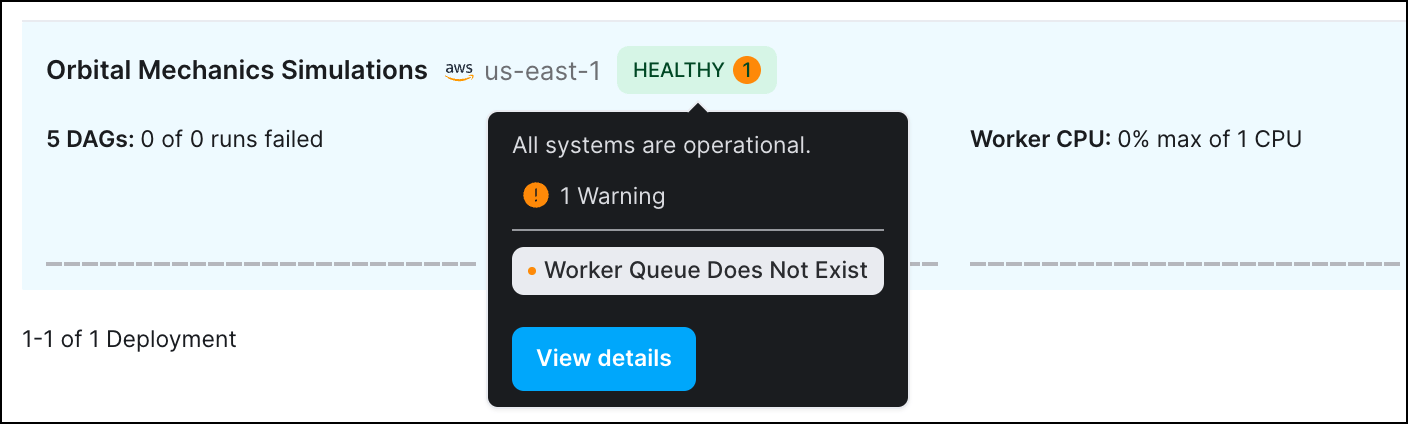
Additional improvements
-
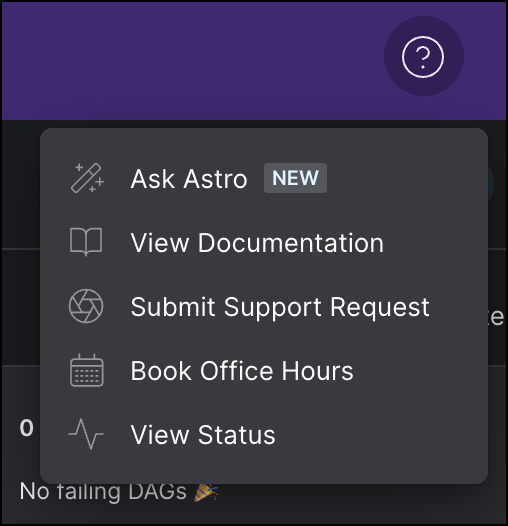
You can now access Ask Astro from the Astro UI Help menu:
- User role titles are now consistently formatted across the Astro UI.
Self-service VPC peering and route management for AWS
You can now configure a network connection between Astro and an AWS VPC without contacting Astronomer support. Astro automatically handles creating a connection request and provides instructions for completing the setup yourself. After you create a VPC connection, you can configure routes whenever you need to connect to an additional service in your external VPC. See Create a private connection between Astro and AWS.Additional improvements
- There is no longer a minimum on the amount of CPU and memory that you can request for Kubernetes Pods.
Bug fixes
- Fixed an issue in Astro Hybrid where refreshing the browser could occasionally reset a worker queue’s worker type setting.
Additional improvements
- The Astro UI Deployment analytics page now shows CPU Usage Per Pod (%) and Memory Usage Per Pod (MB) as a percentage of your total available resources rather than the resources of a single worker Pod, such that these metrics will never show Deployment resources usage as exceeding 100%.
- The maximum value for worker queue Max # of workers has increased from 30 to 100.
Additional improvements
- When you create a Deployment, the Astro UI now shows the Airflow version of your Deployment instead of the equivalent Astro Runtime version.
- Enabled point-in-time restore (PITR) on Hybrid GCP clusters to improve resiliency to outages. Note that this might result in increased costs for cloud storage.
Bug fixes
- Fixed an issue where you occasionally couldn’t access the Airflow UI for a Deployment with the error “No healthy upstream”.
- Fixed an issue where deleting a user with no Workspace membership from an Organization would affect how their Workspace membership appeared in other, unrelated Organizations.
- Fixed an issue where the Open in Airflow button on the dag details page in the Astro UI did not open the Airflow UI as expected.