

- AI model evals assess the output itself. Is it factually correct? Did the agent solve the task it was given? Does it fit the task in aspects like helpfulness and conciseness?
- AI product evals assess what happened after the output was used. Do the AI-generated ads convert? Are customers seeing value in the feature?
- Dag graph
- Eval results
- Code
For a full explanation of this Dag see Example: evaluate generated support replies.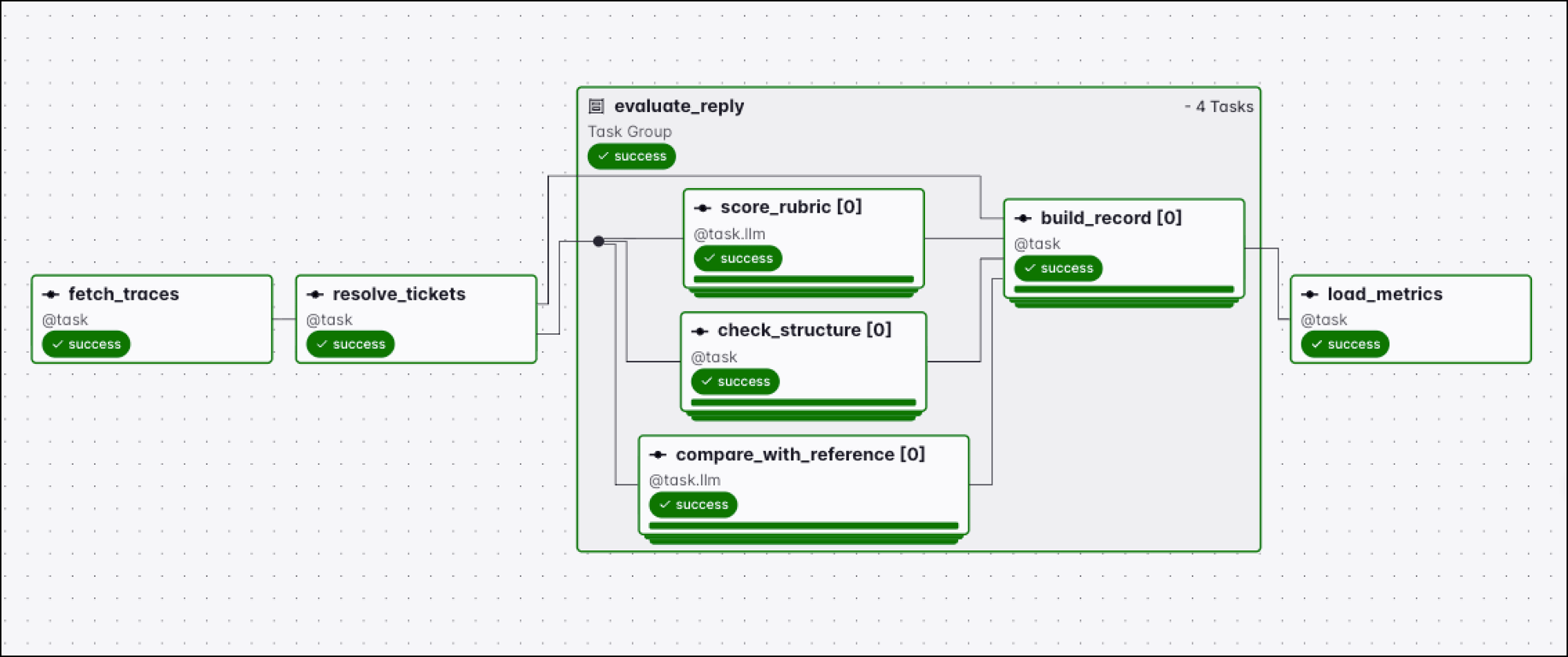
- Why use Airflow for AI model evals.
- Closed-ended and open-ended tasks, the metrics for each, and how to write a rubric.
- How to build a golden dataset.
- How to evaluate output in the context of the traces of a run.
- An example eval Dag that scores generated support replies with a deterministic check and two AI judges.
- An example eval Dag that reports
pass@kfor ticket classification.
Assumed knowledge
To get the most out of this guide, you should have existing knowledge of:- Airflow basics. See Introduction to Apache Airflow®.
- Basic familiarity with LLMs and AI agents.
Why Airflow for AI model evals
AI model evals are performed using pipelines that collect the model output and all traces associated with its production, score it against pre-defined criteria, and write the scores somewhere you can compare them across versions of model choice, model settings, prompts, tools, and more.- Access to traces: every micro orchestrator records what a run did. The Common AI provider emits OpenTelemetry GenAI spans for every model call and tool call, and harnesses such as LangChain, LangGraph, and CrewAI keep their own traces, which you retrieve through their API. Either way, an Airflow task can gather the traces and store the output evaluation results alongside them. See Evaluate output in the context of AI traces.
- Golden dataset creation: offline evals need datasets of inputs paired with expected outputs. Extracting, transforming, and assembling these datasets from your data foundation with human input can be done with dedicated Airflow Dags. See Build a golden dataset.
- AI tasks in eval pipelines: subjective criteria such as tone or whether an answer addresses the question need a model to score them. Many eval pipelines are themselves AI orchestration pipelines using LLMs and agents in an AI-as-a-judge pattern.
- Dynamic task mapping: AI eval pipelines need to assess every model output in a defined timeframe. Dynamic task mapping creates one task instance per case at Dag runtime and executes them in parallel.
- Extensive scheduling options: model evals run on a schedule, and also in reaction to events such as a new model version or a prompt change. Airflow offers time-based schedules, asset-driven, and event-driven scheduling.
- Backfills: when you change your AI model eval, from adding a new field in an existing evaluation metric to adding an additional AI-as-a-judge, you can use Airflow backfills to evaluate historic runs with the new criteria.
- Dag bundle versioning: an AI model evaluation is only actionable if you know which prompt and model configuration produced the output. Prompts and model configuration are defined in Dag code, and versioned Dag bundles allow you to track which version of that code a Dag run used.
- Alerting: a scoring task that compares a rate against a threshold can alert stakeholders through Airflow notifications and Astro alerts.
- Reliability: AI-as-a-judge tasks benefit from the same retry policies as any other Airflow task.
Closed-ended and open-ended tasks
How you evaluate an AI model output depends on whether the task has a clear answer. Many use cases sit on a spectrum between two ends:- Closed-ended tasks have one correct answer. For example, a classification can be compared against a source of truth decided on by a human subject matter expert. Similarly, a field extracted from a document either matches the value in the source document or it doesn’t. Evaluation is deterministic: you can compare the output against the expected value in a golden dataset and report an exact metric, similarly to metrics in traditional machine learning.
- Open-ended tasks have many acceptable answers. A drafted support reply or a summary has no single expected string to compare against. For open-ended tasks, an evaluation rubric can add clear criteria to score AI output against, both for human and AI-as-a-judge scorers.
There are two modes for AI evals:Offline evaluation means running eval pipelines on a separate schedule from the AI data product. Common patterns for offline evals are running the AI against a fixed test set of inputs and comparing the outputs against a golden dataset of best-in-class outputs, or running scheduled batches of AI product evals after gathering signals further downstream, such as customer behavior over time after interaction with the AI data product.Online evaluation scores AI output during live runs of the pipeline, for example in AI-as-a-judge or human-in-the-loop steps within an AI orchestration pipeline. Online evals offer the possibility to act on the evaluation result in the live pipeline, for example preventing a bad AI output from being sent to a customer.
Metrics for closed-ended tasks
A closed-ended task is a prediction problem with labeled ground truth, so the metrics are the ones already used for traditional machine learning models. For example, in the case of classification, accuracy, the fraction of outputs that match the expected value, is often a good overall metric. Precision, recall, and F1 per class, plus a confusion matrix showing which labels the model confuses with which, add additional information about model performance. For an overview of definitions for metrics in traditional machine learning, see Metrics and scoring in the scikit-learn documentation.Metrics for open-ended tasks
Two properties of an open-ended output can in part be measured without a (human or AI) judgment call: functional correctness and similarity against reference data. Functional correctness is whether the AI output performs the function that was asked for. If the prompt asked for an email, is what came back a text that can be reasonably described as an email? Whether you can answer this question deterministically depends on the output format:- Machine-checkable artifacts are deterministic to evaluate. Generated code either parses or it doesn’t, and once it parses, a test suite evaluates whether the code performs the intended task. Generated SQL either executes and returns the expected result or it doesn’t. A generated configuration file either validates against its schema or it doesn’t. Each of these checks can be run as an Airflow task. Give that task a read-only connection and a fixed snapshot to run against: on live tables, a reference query and a generated query executed minutes apart can disagree because the data moved rather than because the model was wrong.
- Prose is more difficult to evaluate with deterministic code. You can add structural checks like whether a report contains every section that a template requires, whether there are any placeholder characters left, or whether a summary is shorter than its input. Most of the time prose needs an AI-as-a-judge or human evaluation.
pass@k is how a functional correctness evaluation is reported as a single number, and it is the score code-generation benchmarks are ranked by. k is the number of solutions the model is allowed to generate per problem, and pass@k is the percentage of problems in the dataset where at least one of those k solutions passes the tests. A model with a pass@1 of 60% and a pass@10 of 85% solves 60% of the problems on its first attempt and 85% of them within ten attempts.
Which
k score is relevant for your use case depends on whether your pipeline can tell a passing solution from a failing one. With downstream tests the pipeline can: generate k candidates in a mapped task, run the test suite against each of them, and only pass a candidate that succeeded to the downstream task. If there is no downstream quality check in your pipeline, every output the model produces is used, so pass@1 is the relevant quality metric.- Exact match works for short outputs: a label, an identifier, a single extracted field. For anything longer, two equally good answers rarely match character for character, so an exact match rate reports failures that aren’t failures.
- Lexical similarity measures overlap in the words themselves. The two most common methods are fuzzy matching, which scores how many single-character edits separate the output from the reference, and n-gram similarity, which scores how many word sequences of a given length the two share.
- Semantic similarity, also called embedding similarity, measures overlap in meaning rather than in wording. Embed both the output and the reference and take the cosine distance between the two vectors, so an answer that uses different words for the same concepts still shows close similarity.
- AI-as-a-judge is given both the reference and the generated output and scores whether they say the same thing.
Write a rubric for subjective criteria
A subjective evaluation gets more exact when you replace the general question, whether the output is any good, with explicit guidelines: a rubric of dimensions, each with defined levels and a confidence score. Scoring against a rubric is relevant both for human and AI judges, and in cases where AI output is scored against reference data or on its own. A human-in-the-loop task puts a person in that judge position, waiting for them to approve, edit, or reject the output, and records what they decided.Dimensions
Which dimensions to pick heavily depends on your use case. For the support ticket replies in the example above:- Relevance: whether the reply addresses what the customer actually asked.
- Helpfulness: whether the reply gives the customer something they can act on.
- Conciseness: whether the reply says what it needs to without padding or repetition.
- Correctness: whether the factual claims agree with the reply the support team wrote. This one is reference-based: the reference is either a golden record, or the AI judge needs access to source-of-truth data.
- Correctness: whether the query answers the question that was asked. Here it can be checked by execution as well as read.
- Efficiency: whether the query avoids full scans, cross joins, and columns the question doesn’t need.
- Readability: whether a reviewer would accept the naming, the CTEs, and the structure.
- Assumptions: whether the query guesses at something ambiguous in the question, such as which date column to filter on.
Fields
When using the Common AI provider, the rubric is theoutput_type of the judge task, with a list of dimensions, each with at least three fields:
- Score, with a list of levels and their meaning. For example, a
Literal["very good", "good", "acceptable", "poor"]with a description and ideally an example for each level. - Confidence: how confident the judge was in the assessment of this dimension. Confidence scores are often used in deciding which records to route to a human reviewer.
- Reasoning: giving a judge the option to explain the reasoning for a score helps when auditing pipelines, and this data can be used to find patterns over time.
output_type schema to the AI model as part of the request, including every field name, type, and description, so it is not necessary to repeat this information in the system prompt.
For a rubric built this way, see SupportReplyScore in Example: evaluate generated support replies.
Some outputs are easier to evaluate as a black box than piece by piece. For a Dag that drafts sales outreach, the reply rate per generated email is one number that comes out of the CRM, while deciding whether an individual email is a good email needs a rubric, a judge, and reference data. In these cases, teams sometimes build the AI product eval first: it measures the end-to-end outcome, and the cases flagged during AI product eval can be a good start to define AI model eval criteria.Eventually, it is recommended to always combine both types of evals, AI model and AI product evals, to avoid situations where the system only optimizes for what is evaluated. For example, sales outreach emails that generate a high response rate, but only because they promise hallucinated features.
Many task types have public benchmarks, and model providers publish how their models score on them. Those numbers are a reasonable way to pick which model to try first. A benchmark measures general capability on someone else’s data, so whether a model works for your use case is a separate question that can only be answered by your own AI eval pipelines.
Build a golden dataset
A golden dataset is a set of inputs paired with the expected output for each one: the labels a closed-ended task should return, or the reference record a reference-based metric compares against. Assembling it and keeping it current is an Airflow pipeline like any other: extract candidate cases from production, produce or collect the expected output, and load the result to a table or object storage. The expected outputs come from one of three places:- Human-written: a person writes the reference records for each input.
- AI-generated: run the most capable model you have access to, without the cost constraints of production, and keep its output as the gold-standard reference. Your production pipeline then runs a cheaper model and the eval asks whether it comes close enough to the expensive model’s answer. Note what this measures. The reference is the ceiling a larger model reached on the same input, and it has not been verified as correct, so a case where both models are wrong would score as a pass.
- Mixed: generate candidate references with the expensive model and have a person review, edit, and approve them. A human-in-the-loop task records the approved version, and the edits themselves show where the generating model fell short and can be used to improve the golden dataset generation pipeline in a context graph pattern.
Evaluate output in the context of AI traces
Your AI model eval pipeline scores AI output. There are many possible reasons for low-quality AI results:- The model isn’t sophisticated enough for the task.
- The prompt did not contain relevant context, or the context given was wrong or outdated.
- The prompt was too long or the context window too small, leading to truncation or compaction and loss of information.
- The output token limit cut the answer off before it was finished.
- A tool failed or returned nothing, and the agent answered anyway.
- The agent called the wrong tool, or called the right tool with the wrong arguments.
- A tool the agent needed wasn’t available, so it guessed instead.
Common AI and OpenTelemetry
The Common AI provider records traces as OpenTelemetry GenAI spans, one per agent run, model call, and tool call, nested under the Airflow task span. Enable tracing by setting the following environment variables for your exporter and collector:AIRFLOW__TRACES__OTEL_ON=True.
An agent run exported to OpenTelemetry by the Common AI provider looks like this (long content values are shortened):
Example: evaluate generated support replies
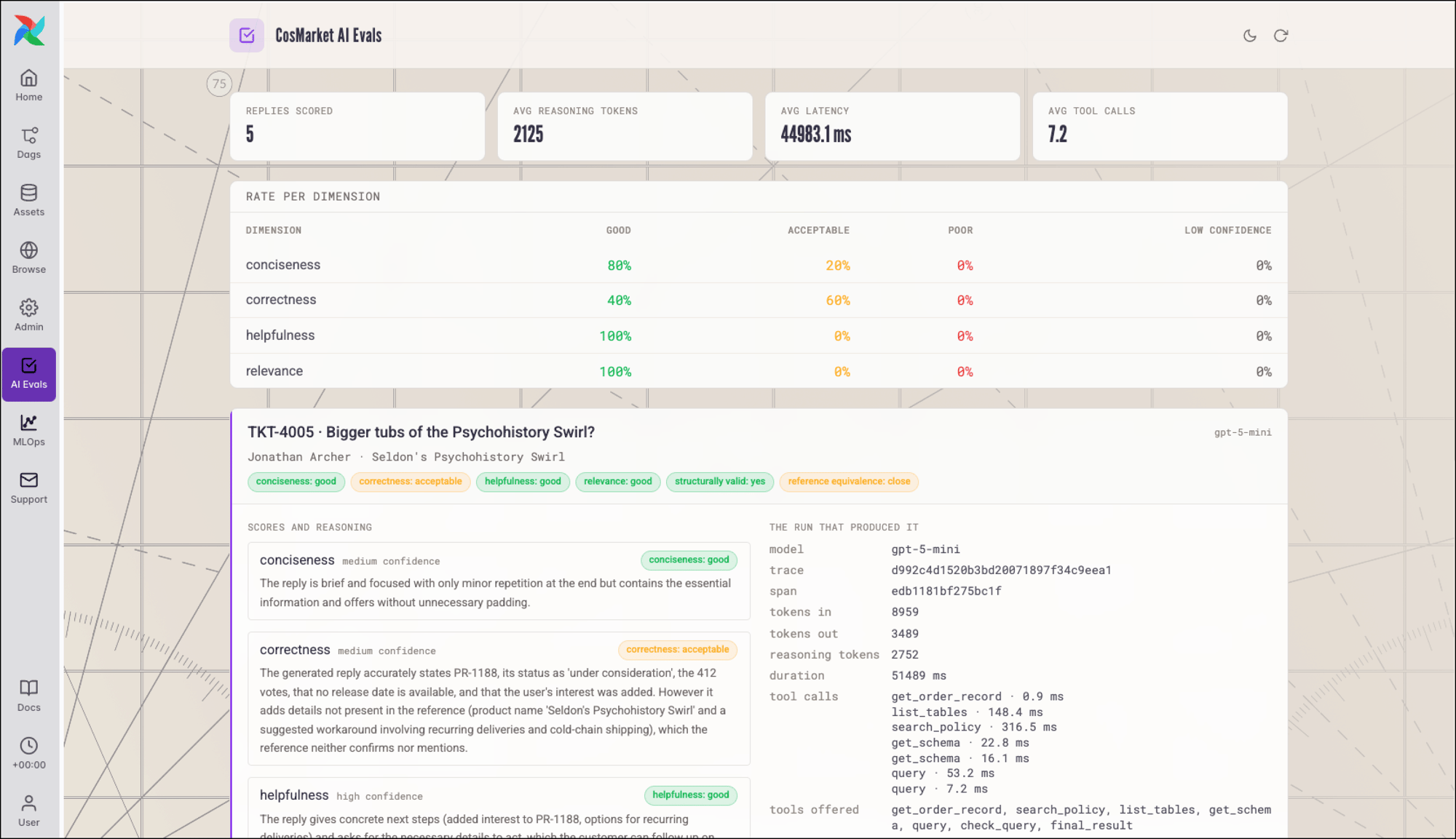
A support agent drafts replies to incoming tickets, reading the order record and the support policy through its tools, all orchestrated with Agent orchestration. The AI model eval Dag fetches the agent traces and evaluates the AI output with one deterministic and two LLM judge tasks.- Dag graph
- Eval results
- Code
- Extract:
fetch_tracesreads the exported spans and returns one record per agent run, with its final output and its tool calls. This example fetches the agent traces from OpenTelemetry with[common.ai] capture_contentturned on, which adds the prompt and completion text to those spans. See Observability. - Resolve:
resolve_ticketsmatches each agent run back to the ticket it answered. The ticket ID is available from the captured prompt, so the task reads it out of the trace and joins the run to that ticket’s customer message and, if available, to its reference reply from the golden dataset. - Score: the
evaluate_replytask group is mapped over those runs, so each reply is scored by its own set of task instances in parallel. There are three scorers, a deterministic check and the two judges:check_structureis a deterministic check with no model call, on the format of the reply: it has content, it is within a length band, it has no unfilled placeholders, and it is signed off.score_rubricis the reference-free judge. It scores relevance, helpfulness, and conciseness, each with its own score, confidence, and reasoning.compare_with_referenceis the reference-based judge. It scores correctness against the reply the support team wrote, and reports which of the reference’s points the generated reply left out.build_recordaggregates the three results and the trace metadata into one row.
- Load:
load_metricswrites one row per reply, then the overall evaluation across all scored inputs: the good rate and the low-confidence rate for every dimension, the share equivalent to the reference, and the average tokens, latency, and tool calls.
Example: pass@k for ticket classification
Classifying a support ticket is a closed-ended task, so the verification task is one equality check against the label in the golden dataset. This Dag classifies every ticketk times and reports pass@k alongside majority vote accuracy.
- Dag graph
- Code
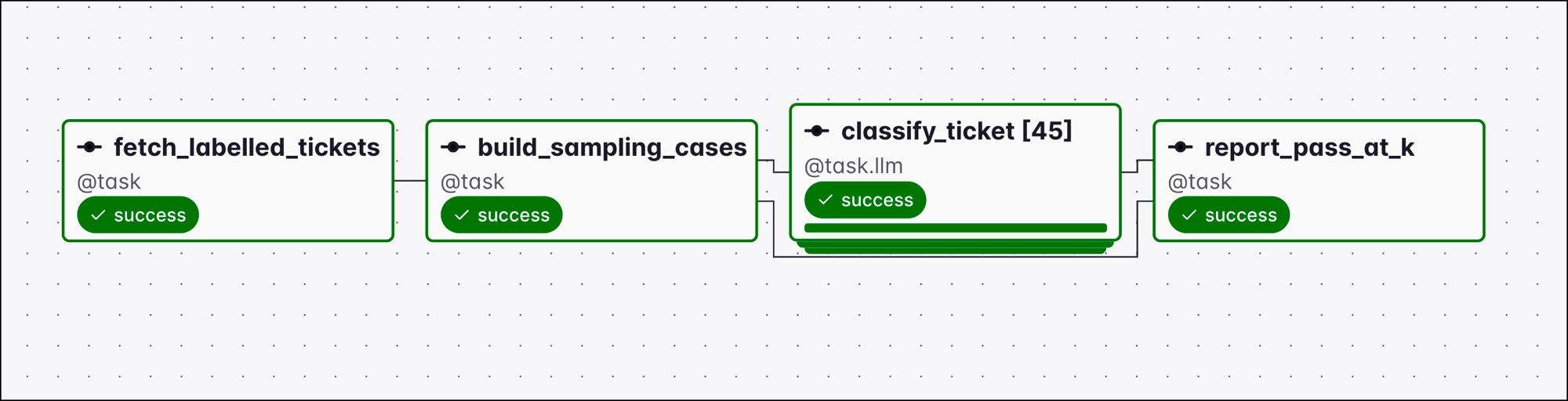
k can be set as a Dag param. build_sampling_cases returns one case per ticket and attempt, and classify_ticket is mapped over that list, so 9 tickets at k=5 is 45 task instances.
report_pass_at_k groups the samples by ticket and reports three numbers:
pass@1: the share of tickets where the first sample matched the label.pass@k: the share where any of theksamples matched.- Majority vote accuracy: the share where the most frequent label matched.
Next steps
- Assess what happened after the output was used with AI product evals.
- Run a single model inference as a task with LLM orchestration with Apache Airflow®.
- Give a model tools and multi-step reasoning with Agent orchestration.
- Add human decisions and capture their output with Human-in-the-loop workflows with Apache Airflow®.