

- Basic AI concepts to understand how to use the Common AI provider.
- How to install the Common AI provider and connect Airflow to your model provider.
- How to use the Common AI decorators and operators.
- How to add toolsets, durable execution, and human-in-the-loop review to your agentic tasks.
Assumed knowledge
To get the most out of this guide, you should have an existing knowledge of:- Basic Airflow concepts. See Introduction to Apache Airflow.
- Airflow operators and decorators. See Airflow operators and Airflow decorators.
- Airflow hooks. See Airflow hooks.
Concepts
The Common AI provider abstracts calls to LLMs (large language models) and LMMs (large multimodal models), often as an AI agent with tool access. The calls are made through PydanticAI, which provides a consistent interface for all compatible model providers.Keep in mind that LLMs and LMMs aren’t deterministic and therefore tasks using these models aren’t idempotent. This means you might get different results when rerunning or backfilling Dags that contain AI-based tasks, even if all inputs are the same.
Install the Common AI provider
To use the Common AI provider, you need to be at least on Airflow 3.0 and install it by adding it to yourrequirements.txt file. Make sure to pin the latest version.
SQLToolset, @task.llm_sql, @task.llm_schema_compare, or other features that read database metadata through a DbApiHook.
Extras
Several features require installation of an extra of the Common AI provider:
For example, to use
SQLToolset and MCPToolset in the same project:
openai, anthropic, google, and bedrock, which install the matching PydanticAI dependencies.
DataFusionToolset is the exception to this pattern: it needs the datafusion extra of the Common SQL provider rather than an extra of the Common AI provider.
Set the PydanticAI connection
The Common AI provider uses the same operators and decorators across many model providers by interacting with them through PydanticAI. You can you switch providers by updating the Airflow connection. The connection has the following format:model in the connection extra field in the format <your_provider>:<your_model> (for example anthropic:claude-opus-4-7). Models can be overridden at the task level, as long as the model is accessible through the provided Airflow connection.
Decide which decorator to use
The following table lists each decorator and operator in the Common AI provider and describes typical use cases.@task.agent
The @task.agent decorator and AgentOperator let you run a PydanticAI agent as a task in your Airflow Dag.
@task.agent decorated function is the user prompt input to the agent. When using the AgentOperator directly, providing a user prompt with the prompt parameter is required.
The only other mandatory parameter is llm_conn_id, the Airflow connection ID to use for the LLM.
The following optional parameters are available for the @task.agent decorator:
model_id: The model to use for the agent. If not given, the operator uses the model set in the Airflow connection. You need to set the model in the format<your_provider>:<your_model>, for exampleanthropic:claude-opus-4-7.system_prompt: The system prompt to use for the agent, which is loaded into context before the user prompt. It is common to give general instructions to the agent in the system prompt about their role and task, as well as information about available tools. Note that instructions given in the prompt aren’t guaranteed to be followed.output_type: The format for the output from the agent. You can use primitive types likestr,int,float,bool, or a subclass of Pydantic BaseModel for more complex structured outputs. Defaults tostr. Theoutput_typeformat is enforced, in contrast to instructions in the prompt.toolsets: The toolsets the agent has access to as a list ofpydantic_ai.toolset instances. Defaults toNone.enable_tool_logging: IfTrue, every toolset is wrapped in aLoggingToolsetthat logs tool calls with timing at INFO level and arguments at DEBUG level. Defaults toTrue.agent_params: Additional keyword arguments passed to the agent constructor. See the PydanticAI agent documentation for a list of available parameters.durable: Whether to enable step-level caching of model responses and tool results, so an Airflow retry resumes from the last completed step. In Airflow 3.2 and earlier, you also need to setAIRFLOW__COMMON_AI__DURABLE_CACHE_PATH. See durable execution. Defaults toFalse. Can’t be used with human-in-the-loop review.enable_hitl_review: Whether to enable human-in-the-loop review through an Airflow plugin. Defaults toFalse. Needs Airflow 3.1+ and can’t be used with durable execution.max_hitl_iterations: The maximum number of iterations of human-in-the-loop review. Defaults to5.hitl_timeout: The timeout for the human-in-the-loop review as a timedelta object. Defaults toNone.hitl_poll_interval: The interval between polling for human-in-the-loop review. Defaults to10.0.
Toolsets
AI agents can use tools to perform actions in another system. Tools are typically implemented as functions that can be called by the agent. A toolset is a collection of such functions in a class. When using the Common AI provider, your agents can use three types of toolsets:- Pre-built toolsets included in the Common AI provider:
SQLToolsetandMCPToolset. - Use any Airflow hook as a toolset by wrapping it in the
HookToolsetclass, the hook methods are the tools the agent can call. - Custom toolsets you can implement yourself by subclassing a
pydantic_ai.toolset class.
Pre-built toolsets
The SQLToolset is a curated toolset that gives your agent access to a SQL database, only allowing the following methods:list_tables, get_schema, query (SELECT only by default), and check_query. It can be used with any SQL database that is supported by the DbApiHook.
MCPHook to retrieve credentials from an Airflow connection and creates a PydanticAI MCP server instance.
-
Streamable HTTP: Uses HTTP to stream responses, recommended for remote servers. If your
hostdoesn’t require authentication, you can omit thepasswordfield. -
stdio: Runs the MCP server as a subprocess communicating over stdin/stdout.
Use Airflow hooks as toolsets
You can use any Airflow hook as a toolset by wrapping it in theHookToolset class. The hook methods are the tools the agent can call. The allowed_methods parameter is required to make methods available to the agent, auto-discovery is intentionally disabled for safety purposes.
Human-in-the-loop review
Human-in-the-loop review lets you iterate on the output of an agentic task by reviewing the agent output and providing feedback. An Airflow plugin adds a HITL Review tab to the task instance page in the Airflow UI. This is different from human-in-the-loop operators, which surface decisions under Required Actions.- Approve: The task succeeds with the current assistant output and the HITL review ends.
- Provide feedback to the agent and click Send: The agent will take the feedback as user prompt and regenerate the output. The maximum number of iterations is controlled by the
max_hitl_iterationsparameter. - Reject: The task fails and the next iteration isn’t started.
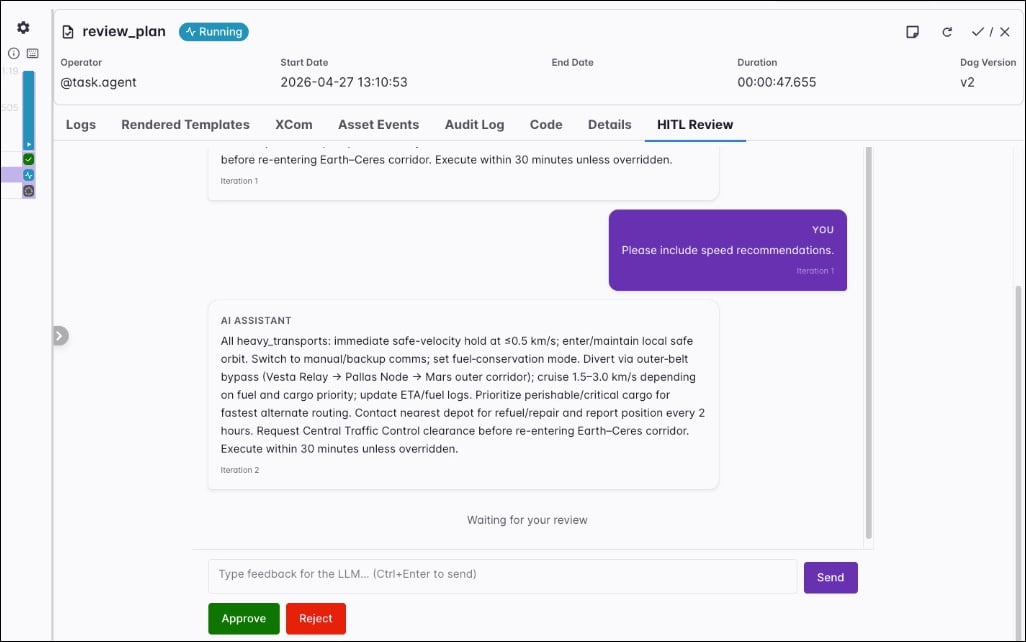
hitl_timeout parameter provides an optional time limit for the entire HITL review phase, that is, all review rounds combined. When that limit is exceeded, the task fails. The hitl_poll_interval parameter is the number of seconds to wait between polls for the reviewer action on the human-action XCom key.
Durable execution
Thedurable parameter allows you to enable step-level caching of model responses and tool results. When a task is retried, steps that have already finished don’t run again; the task reads their results from the cache instead. See Durable execution and the task state store for the concept and the Airflow feature behind it.
In Airflow 3.3 and later, the cache uses the task state store and needs no configuration other than setting durable=True.
To run an agent in durable mode set durable=True.
You can only use
durable=True if enable_hitl_review=False.Configure the durable cache in Airflow 3.2 and earlier
In Airflow 3.2 and earlier, to enable durable mode you need to set theAIRFLOW__COMMON_AI__DURABLE_CACHE_PATH environment variable to the path where the cache will be stored. The destination can be a local temporary directory on the worker or remote object storage like S3 or GCS. After successful task execution the cache is deleted.
Output type
Passoutput_type to set the format of the agent output. It can be a primitive type like str, int, float, bool, or a subclass of Pydantic BaseModel for more complex structured outputs. Use the Field class to add descriptions to the fields for the agent to use.
MyOutputClass as the output_type parameter the agentic task will always produce a JSON output with the fields and their values.
@task.llm
The @task.llm decorator and LLMOperator make a single turn LLM call and return the model output.
@task.llm callable returns is the user prompt sent to the model. When you using LLMOperator directly, the prompt argument is required.
Optional parameters:
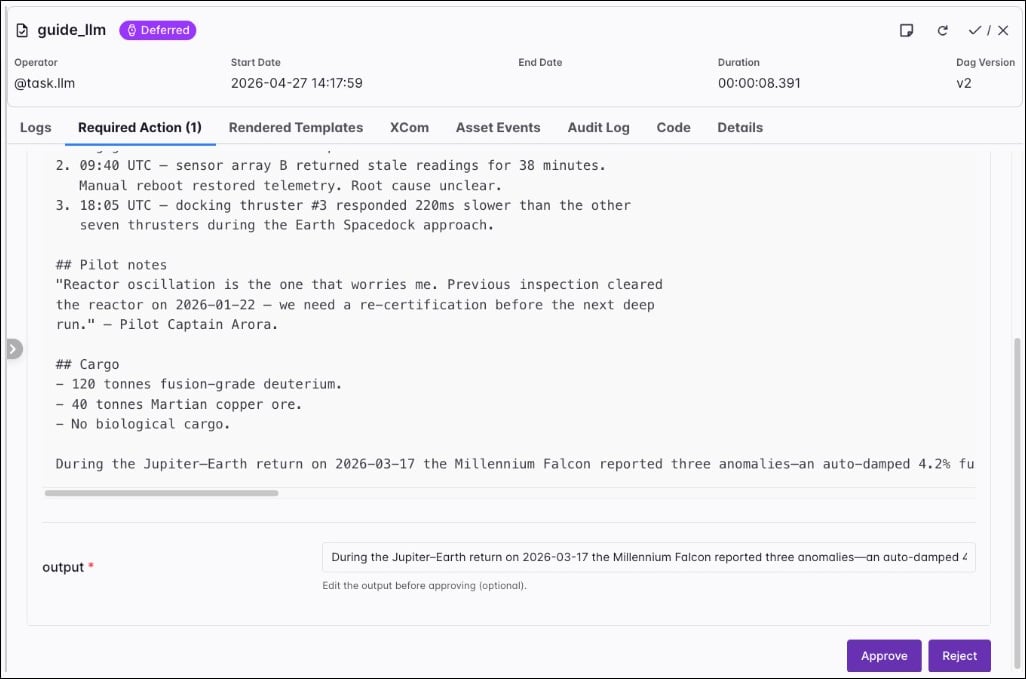
model_id: Overrides the model in the connectionextra(format:<provider>:<model>).system_prompt: System instructions loaded before the user prompt.output_type: Return type for the run. Defaults tostr. For structured JSON, set a subclass of PydanticBaseModel, see Output type.agent_params: Extra keyword arguments for the PydanticAIAgentconstructor (for examplemodel_settings). See the PydanticAI Agent parameters. Despite performing a single turn LLM call, you can still pass arguments to the agent constructor when using@task.llm.require_approval: WhenTrue, the task defers after generation until a human approves or rejects through the approval UI. Defaults toFalse.approval_timeout: Time limit to wait for a review whenrequire_approvalisTrue. When it is exceeded, the task fails. Defaults toNone.allow_modifications: WhenTruewith approval enabled, the reviewer can edit the generated text before approval; that edited value becomes the task result. Defaults toFalse.
require_approval is True, the task defers after the model returns its output. In the Airflow UI, open the task instance, select the Required Action tab, read the generated text, edit the output if needed, and then click Approve or Reject.
Human-in-the-loop review behaves differently for
@task.llm and @task.agent. With @task.llm, the task defers after generation until a human approves or rejects through the approval UI. There is only one approval step, and the reviewer can edit the model output before approval when allow_modifications is True. With @task.agent and enable_hitl_review=True, the task doesn’t defer; it keeps running after output generation and waits on the HITL Review tab for approval, rejection, or feedback that triggers another iteration. Use max_hitl_iterations to cap how many review rounds run.@task.llm_sql
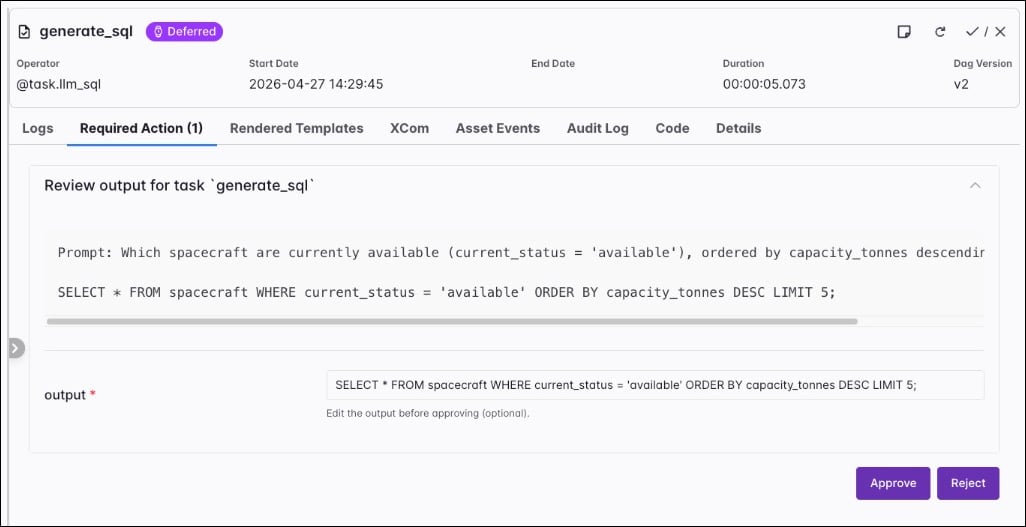
The @task.llm_sql decorator and LLMSQLQueryOperator turn natural language into SQL. The operator can pull table metadata through a DbApiHook from db_conn_id, or you can supply a full schema string yourself. It generates SQL only; it doesn’t run queries. Downstream tasks (for example SQLExecuteQueryOperator) can execute the string returned in XCom.
prompt that describes the query you want. When you use LLMSQLQueryOperator directly, pass that text with the prompt argument. You must set llm_conn_id to the PydanticAI connection.
Additional parameters:
db_conn_id: Airflow connection used to access metadata about your database. The hook must be aDbApiHook. Omit when you fully describe the schema withschema_context.table_names: List of table names to include when accessing the database withdb_conn_id.schema_context: Free-form schema description. When you set this, the operator doesn’t access the database for metadata.validate_sql: WhenTrue(default), generated SQL is checked with sqlglot before the task finishes.allowed_sql_types: Tuple of allowed statement roots (defaults to read-only shapes such asSelect,Union,Intersect, andExceptin sqlglot). Be careful when adding writing statements likeInsert,Update, orDelete.dialect: sqlglot dialect name (for examplepostgres,mysql). WhenNone, the operator tries to infer it from the database hook.datasource_config: Optional extra configuration for the data source side of generation (see the provider source for structure when you need it).
LLMOperator (model_id, system_prompt, output_type, agent_params, require_approval, approval_timeout, allow_modifications) behave like they do for @task.llm. When require_approval is True and allow_modifications is True, a reviewer can edit the generated SQL; the provider re-validates edited SQL against the allowed_sql_types rules before returning it.
@task.llm_branch
The @task.llm_branch decorator and LLMBranchOperator extend the LLMOperator with branching. At run time the operator reads downstream task IDs from the Dag, exposes them to the model as a constrained Enum through PydanticAI structured output, and skips tasks the model doesn’t select. Note that you need to create a dependency between the branch task and its downstream candidates.
prompt. When you use LLMBranchOperator directly, pass that text with the prompt argument. Set llm_conn_id to the PydanticAI connection. Additionally, you can set allow_multiple_branches to True to allow the model to return multiple downstream task IDs.
Parameters inherited from LLMOperator (model_id, system_prompt, agent_params, and the same optional human-in-the-loop approval fields as @task.llm) behave the same way as for a plain LLM task.
@task.llm_file_analysis
The @task.llm_file_analysis decorator and LLMFileAnalysisOperator analyze one file, a prefix, or a small set of files through a single LLM call. The operator resolves file_path with ObjectStoragePath, normalizes supported formats into text context, and optionally attaches PNG, JPG, or PDF inputs as multimodal payloads when multi_modal=True. For object storage URIs you can embed the connection ID in the path (for example s3://<conn_id>@my-bucket/prefix/) or set file_conn_id separately.
prompt. When you use LLMFileAnalysisOperator directly, pass that text with the prompt argument.
Additional parameters:
file_path: File or prefix to analyze (local paths or object storage paths supported by Airflow object storage).file_conn_id: Optional Airflow connection for the storage backend when it isn’t embedded infile_path.multi_modal: WhenTrue, PNG, JPG, JPEG, and PDF inputs can be sent as binary attachments; requires a multimodal-capable model.max_files,max_file_size_bytes,max_total_size_bytes,max_text_chars,sample_rows: Guardrails for listing, reading, and how much normalized text or row samples reach the model. Extra files under a large prefix are omitted and the operator notes that in the prompt context.
@task.llm_schema_compare
The @task.llm_schema_compare decorator and LLMSchemaCompareOperator read schema metadata from two or more systems and ask an LLM to flag differences. The task result is a dict SchemaCompareResult with fields such as compatible, mismatches, and summary. Each entry in mismatches is a SchemaMismatch with severity, column, types, and suggested actions.
You can supply databases in two ways:
db_conn_idstogether withtable_names: shorthand to compare the same logical table across connections. Each connection must resolve to aDbApiHook.data_sources: a list ofDataSourceConfigobjects for more complex setups (for example object storage or catalog-backed sources combined withdb_conn_ids).
prompt. When you use LLMSchemaCompareOperator directly, pass that text with the prompt argument.
Additional parameters:
db_conn_idsandtable_names: Use together for the same table name across multiple database connections.data_sources: Optional list ofDataSourceConfigfor mixed database and object storage comparisons.context_strategy:"basic"sends column names and types only;"full"(default) adds primary keys, foreign keys, and indexes to the context sent to the model.system_prompt: The operator ships a default prompt that encodes cross-system type rules and severity levels. If you setsystem_promptto any string, it replaces that default; importDEFAULT_SYSTEM_PROMPTand concatenate when you want to extend rather than replace.
LLMOperator (model_id, agent_params, and optional approval fields) match @task.llm. Downstream tasks can branch on comparison_result["compatible"] or inspect mismatches as shown in the Airflow documentation.