

Overview
Data exploration often necessitates repeated model calls and tool calls. An AI agent can write and execute several queries in sequence, reason over what comes back, and decide what to look at next, similarly to a human analyst. This architecture orchestrates a data exploration agent as an on-demand Airflow Dag. A stakeholder asks a data question in natural language, and the pipeline pulls in the request, the data catalog, and that stakeholder’s access permissions. The agent then uses toolsets to query the data, reasons over the results, and decides what to explore next. Once it has enough to answer the question, it writes a report and sends it back to the stakeholder in Slack. In this use case, the output is only received by an internal stakeholder, which means immediate quality control like a human-in-the-loop step is less crucial than with customer-facing data products. If the answer returned by the agent is wrong or incomplete, the employee, given that they notice the agent’s mistake, can ask again or escalate to the data team. If you orchestrate agents or LLMs that produce output or actions that are customer facing, you need quality control as part of the pipeline. For an example, see the support ticket agent architecture.Architecture
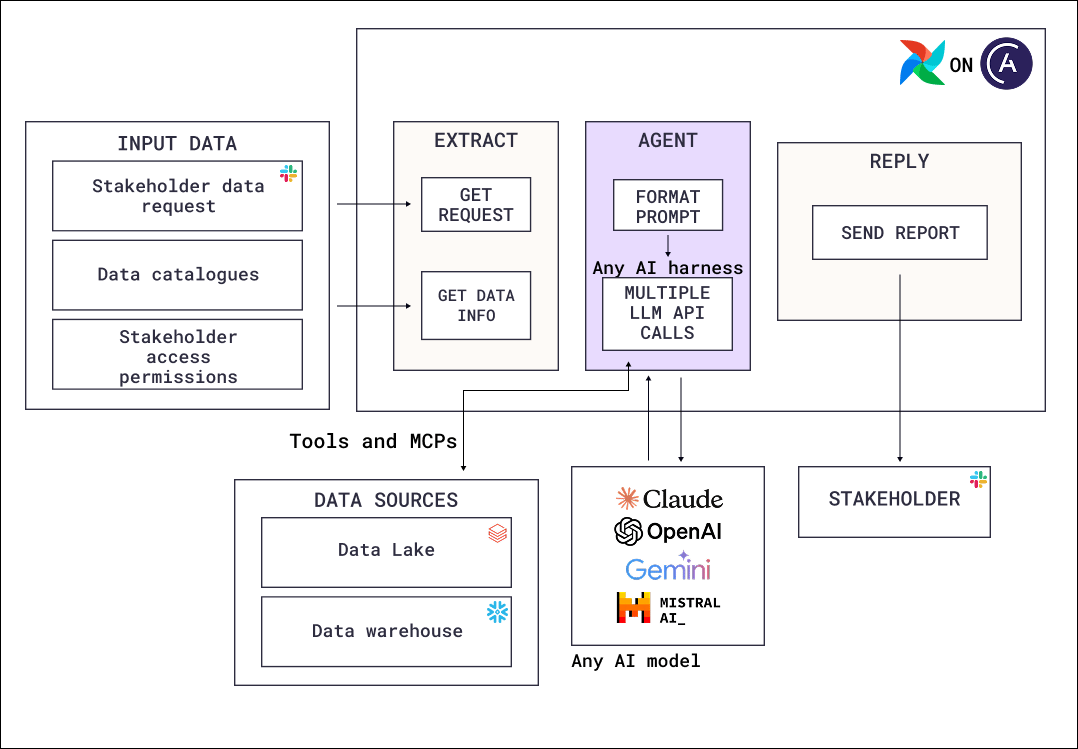
- Input data: Three separate inputs. The stakeholder’s question is sent from a frontend like Slack. The data catalog tells the agent what tables exist and what they mean. The stakeholder’s access permissions determine what the agent is allowed to query on their behalf.
- Extract: Deterministic tasks fetch the request and the catalog information into the agent’s initial context.
- Agent: A tool-calling loop with access to a data lake and a data warehouse through tools and MCP servers. It writes a query, reads the result, and decides whether it has enough to answer or needs another query.
- Reply: A deterministic task sends the finished report back to the stakeholder in the channel they asked from.
Airflow features
@task.agent: Runs the exploration loop as a task with several model and tool calls.- Toolsets: Give the agent query access to the data lake and warehouse. The Common AI provider’s
SQLToolsetworks with any database supported by aDbApiHook, and queries can be restricted withallowed_tables,allowed_functions,allow_writes, andmax_rows. We also recommend scoping the Airflow connection to non-destructive permissions. - Structured output: Constrains what the agent returns, so the reply task receives a report with the expected fields.
- Event-driven scheduling: Triggers a pull-based Dag run whenever a stakeholder submits a question.
- Retry policies: The agent task retries when failing due to rate limits and transient provider errors, but not for failures a retry cannot fix, such as an authentication error. The
ExceptionRetryPolicyallows you to define when and how a task instance should retry based on the exception that caused the failure. Additionally, the Common AI provider’sLLMRetryPolicycan classify unpredictable provider errors with a model call.
Considerations
- Scope every tool at the level of the Airflow connection. This architecture needs connections scoped in two ways: the agent must not be able to execute queries that modify or delete data, and it must only query data the asking stakeholder is allowed to see. A product manager asking about feature adoption should not be able to access sensitive PII from an HR table.
- Do not rely on the prompt for guardrails. Writing “never delete any tables” in a system prompt gives no guarantee. Agents can stop following context instructions for many reasons, from prompt injection to instructions being lost during context window compaction. The only effective control is to limit what each tool can do. In the case of
SQLToolsetfrom the Common AI provider, several options such as restrictingallowed_tablesare available. Combine these restrictions with scoped connections. - Give the agent the table and column descriptions. Column names alone produce queries that are syntactically valid and semantically wrong. Table and column descriptions form the semantic layer, which helps agents understand how your company defines values, for example revenue or churn risk.
- Limit the agentic loop. An agent exploring a large database can run many expensive queries.
usage_limitsrestricts requests, tokens, and tool calls per task, andmax_rowson the toolset limits how much data a query can return. We recommend limiting the warehouse the agent uses for its database queries in both duration and cost.
Next steps
- Look up decorator, toolset, and operator parameters in Orchestrate AI tasks with Apache Airflow® and the Common AI provider and Restrict what an agent can do.
- Add verification steps for an external audience with Support ticket agent.
- See how Astronomer runs a similar architecture internally in Building Kepler, Astronomer’s internal data assistant.
- Read the AI Orchestration with Apache Airflow® eBook for the full set of AI orchestration patterns.
- Deploy the Airflow pipelines with a free trial of Astro.