

Assumed knowledge
To get the most out of this guide, you should have an understanding of:- Airflow operators. See Operators 101.
- Dag writing best practices. See Dag writing best practices in Apache Airflow.
Best practices
Before you dive into the specifics, there are a couple of important concepts to understand before you write Dags that pass data between tasks.Ensure idempotency
An important concept for any data pipeline, including an Airflow Dag, is idempotency. This is the property whereby an operation can be applied multiple times without changing the result. This concept is often associated with your entire Dag. If you execute the same Dag run multiple times, you will get the same result. However, this concept also applies to tasks within your Dag. If every task in your Dag is idempotent, your full Dag is idempotent as well. When designing a Dag that passes data between tasks, it’s important that you ensure that each task is idempotent. This helps with recovery and ensures no data is lost if a failure occurs.Consider the size of your data
Knowing the size of the data you are passing between Airflow tasks is important when deciding which implementation method to use. As you’ll learn, XComs are one method of passing data between tasks, but they are only appropriate for small amounts of data. Large data sets require a method making use of intermediate storage and possibly utilizing an external processing framework.In Airflow 3.3 and later, you can also use the asset state store to share small, JSON-serializable values between tasks. The asset state store keeps key-value pairs attached to an asset instead of a task instance. Any task that lists the asset in its
inlets or outlets can read and write these values, including tasks in other Dags and later Dag runs. See Durable execution with the asset state store.XCom
The first method for passing data between Airflow tasks is to use XCom, which is a key Airflow feature for sharing task data.What is XCom
XCom is a built-in Airflow feature. XComs allow tasks to exchange task metadata or small amounts of data. They are defined by a key, value, and timestamp, and are attached to the task instance that pushed them. XComs can be “pushed,” meaning sent by a task, or “pulled,” meaning received by a task. When an XCom is pushed, it is stored in the Airflow metadata database and made available to all other tasks. Any time a task returns a value (for example, when your Python callable for yourPythonOperator has a return), that value is automatically pushed to XCom. Tasks can also be configured to push XComs by calling the xcom_push() method. Similarly, xcom_pull() can be used in a task to receive an XCom.
You can view your XComs in the Airflow UI by going to Browse > XComs. You should see something like this:

When to use XComs
XComs should be used to pass small amounts of data between tasks. For example, task metadata, dates, model accuracy, or single value query results are all ideal data to use with XCom. While you can technically pass large amounts of data with XCom, be very careful when doing so and consider using a custom XCom backend and scaling your Airflow resources. Airflow clears XComs when a task instance retries, so information that a later attempt of the same task needs (durable execution) has to be stored in the task state store. See Task state store vs. XCom for the comparison. When you use the standard XCom backend, the size-limit for an XCom is determined by your metadata database. Common sizes are:- Postgres: 256 MiB in Airflow 3, 1 GiB in Airflow 2
- SQLite: 1 GB by default
- MySQL: the value of
max_allowed_packet, 64 MiB by default
- JSON.
- pandas DataFrame. Requires the
pyarrowpackage. - Delta Lake tables.
- Apache Iceberg tables.
- NumPy types,
datetime,date,timedelta,Decimal, andUUIDobjects, tuples, and sets. - Python dataclasses,
attrsclasses, and Pydantic models. If a task returns an object of a class you define, add the class’s import path to theallowed_deserialization_classesconfiguration, and keep the default entries in the list. Otherwise, the downstream task that reads the XCom fails with anImportError. See Serialization in the Airflow documentation.
Custom XCom backends
Using a custom XCom backend means you can push and pull XComs to and from an external system such as S3, GCS, or HDFS rather than the default of Airflow’s metadata database. You can also implement your own serialization and deserialization methods to define how XComs are handled. The Common IO provider includes an Object Storage XCom Backend,XComObjectStorageBackend, which stores XComs larger than a configurable threshold in Amazon S3, Google Cloud Storage, or Azure Blob Storage. To set it up, follow the Set up a custom XCom backend using object storage tutorial.
Example Dag using XComs
In this section, you’ll review a Dag that uses XCom to pass data between tasks. The Dag uses XComs to analyze cat facts that are retrieved from an API. To implement this use case, the first task makes a request to the cat facts API and pulls thefact parameter from the results. The second task takes the results from the first task and performs an analysis. This is a valid use case for XCom, because the data being passed between the tasks is a short string.
- TaskFlow
- Traditional
You can use the TaskFlow API to push and pull values to and from XCom. To push a value to XCom return it at the end of your task as with traditional operators. To retrieve a value from XCom provide the object created by the upstream task as an input to your downstream task.Using the TaskFlow API usually requires less code to pass data between tasks than working with the traditional syntax.
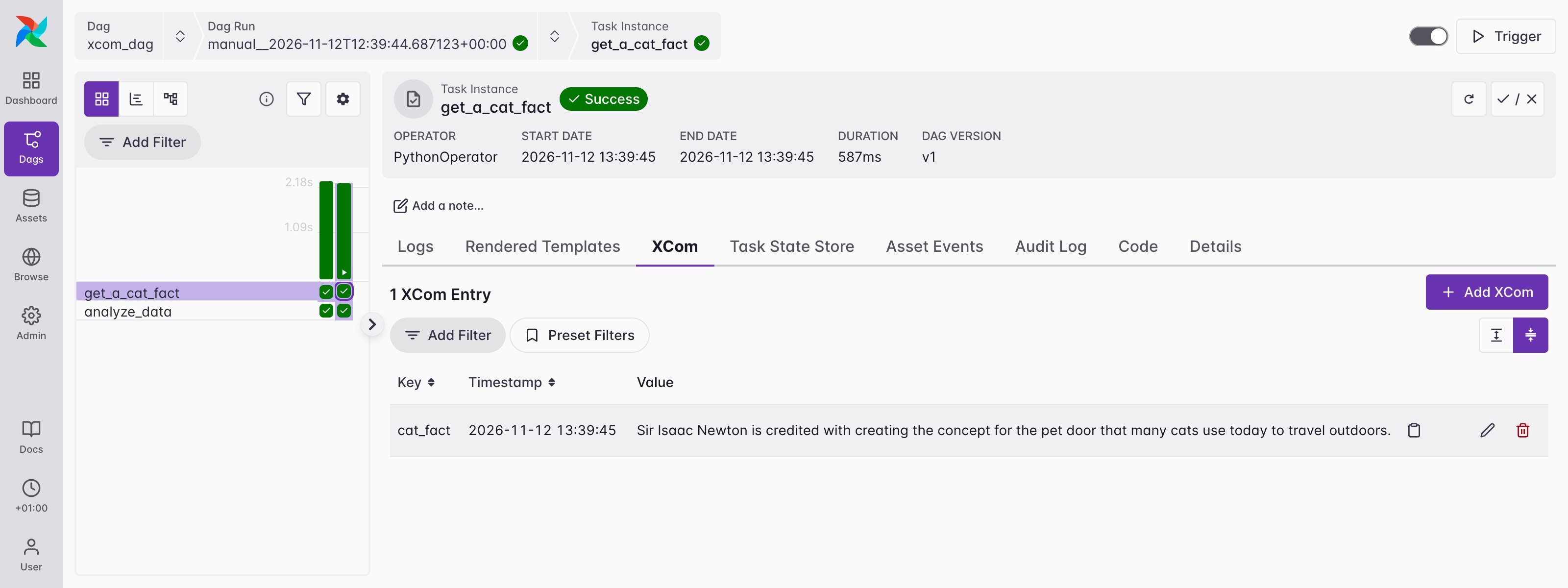
get_a_cat_fact task instance in the Airflow UI, you’ll see that a new row has been added for your get_a_cat_fact task with the key cat_fact and the value returned from the API.
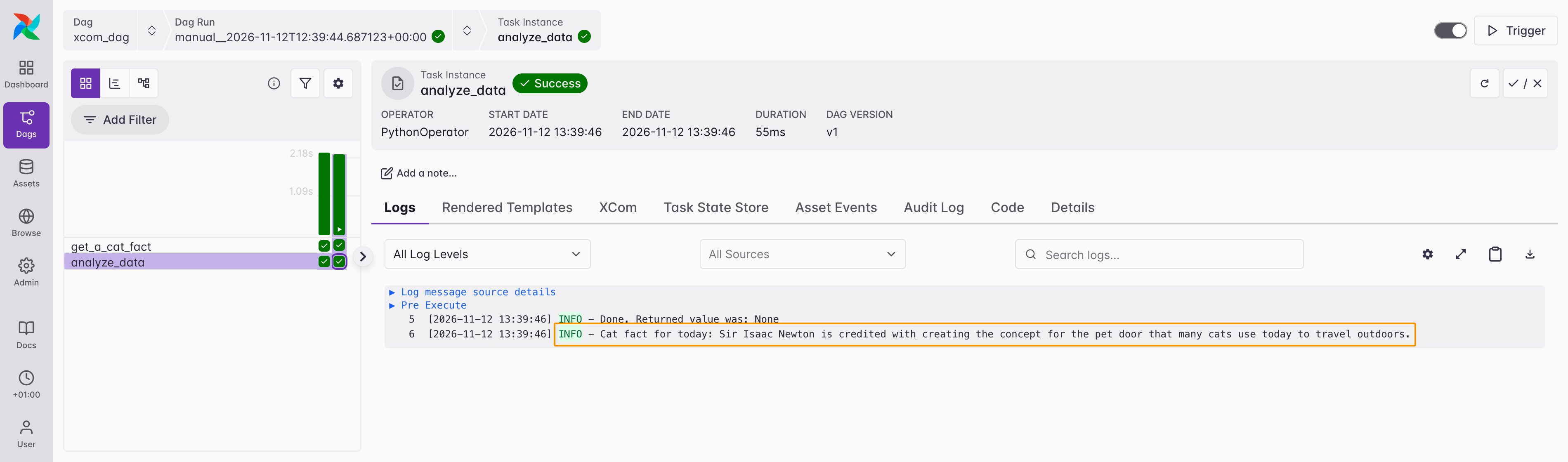
analyze_data task, you can see the value from the prior task was printed, meaning the value was successfully retrieved from XCom.
Intermediary data storage
As mentioned previously, XCom is a great option for sharing data between tasks because it doesn’t rely on any tools external to Airflow itself. However, it is only designed to be used for very small amounts of data. What if the data you need to pass is a little bit larger, for example a small dataframe? The best way to manage this use case is to use intermediary data storage. This means saving your data to some system external to Airflow at the end of one task, then reading it in from that system in the next task. This is commonly done using cloud file storage such as S3, GCS, or Azure Blob Storage, but it could also be done by loading the data in either a temporary or persistent table in a database. While this is a great way to pass data that is too large to be managed with XCom, you should still exercise caution. Airflow is meant to be an orchestrator, not an execution framework. If your data is very large, it is probably a good idea to complete any processing using a framework like Spark or compute-optimized data warehouses like Snowflake or dbt.Example Dag
Building on the previous cat fact example, you are now interested in getting more cat facts and processing them. This case would not be ideal for XCom, but since the data returned is a small dataframe, it can be processed with Airflow.- TaskFlow
- Traditional
S3Hook to save data retrieved from the API to a CSV on S3 in the generate_file task. The process_data task then takes the data from S3, converts it to a dataframe for processing, and then saves the processed data back to a new CSV on S3.