

You don’t need to write your agents in PydanticAI to use the Common AI provider. The provider includes modules for the OpenAI Agents SDK, the Anthropic SDK, the Claude Agent SDK, Strands Agents, Google ADK, LangChain, and LlamaIndex, as well as sandbox backends such as Modal and OpenSandbox. See Supported frameworks and services.
- Basic AI concepts to understand how to use the Common AI provider.
- How to install the Common AI provider and connect Airflow to your model provider.
- How to use the Common AI decorators and operators.
- How to add toolsets, durable execution, human-in-the-loop review, and tool approval to your agentic tasks.
- How to limit usage, fail over between model providers, and retry failed AI tasks.
Assumed knowledge
To get the most out of this guide, you should have an existing knowledge of:- Basic Airflow concepts. See Introduction to Apache Airflow.
- Airflow operators and decorators. See Airflow operators and Airflow decorators.
- Airflow hooks. See Airflow hooks.
Concepts
The Common AI provider abstracts calls to LLMs (large language models) and LMMs (large multimodal models), often as an AI agent with tool access. The calls are made through PydanticAI, which provides a consistent interface for all compatible model providers.Keep in mind that LLMs and LMMs aren’t deterministic and therefore tasks using these models aren’t idempotent. This means you might get different results when rerunning or backfilling Dags that contain AI-based tasks, even if all inputs are the same.
Install the Common AI provider
To use the Common AI provider, you need Airflow 2.11 or later and Python 3.11 or later. Several features need a later Airflow version, see Feature requirements by Airflow version. Install the provider by adding it to yourrequirements.txt file. Make sure to pin the latest version.
SQLToolset, @task.llm_sql, @task.llm_schema_compare, or other features that read database metadata through a DbApiHook.
Supported frameworks and services
The decorators and operators in this guide orchestrate PydanticAI agents. If your team uses a different framework, you can keep using the SDK of that framework in a@task and use the Common AI provider for model connections and toolsets. For some frameworks, the provider includes specific modules:
Some frameworks pin dependencies that conflict with the Airflow constraints file. See the tested versions in Agent frameworks.
See Sandbox backends and Managed agent toolsets in the provider documentation.
Extras
Several features require installation of an extra of the Common AI provider:
For example, to use
SQLToolset and MCPToolset in the same project:
openai, anthropic, google, and bedrock, which install the matching PydanticAI dependencies.
DataFusionToolset is the exception to this pattern: it needs the datafusion extra of the Common SQL provider rather than an extra of the Common AI provider.
Feature requirements by Airflow version
The following table lists the features that need more than the minimum Airflow version.Set the PydanticAI connection
The Common AI provider uses the same operators and decorators across many model providers by interacting with them through PydanticAI. You can switch providers by updating the Airflow connection. The connection has the following format:model in the connection extra field in the format <your_provider>:<your_model> (for example anthropic:claude-opus-4-7). Models can be overridden at the task level, as long as the model is accessible through the provided Airflow connection.
The provider also has the connection types pydanticai_azure, pydanticai_bedrock, and pydanticai_vertex for the matching cloud platforms. See Connections for the fields of each type. For the extra, model prefix, and connection type to use with each model provider, see Supported model providers.
Decide which decorator to use
The following table lists each decorator and operator in the Common AI provider and describes typical use cases.@task.agent
The @task.agent decorator and AgentOperator let you run a PydanticAI agent as a task in your Airflow Dag.
@task.agent decorated function is the user prompt input to the agent. When using the AgentOperator directly, providing a user prompt with the prompt parameter is required.
The only other mandatory parameter is llm_conn_id, the Airflow connection ID to use for the LLM.
The following optional parameters are available for the @task.agent decorator:
model_id: The model to use for the agent. If not given, the operator uses the model set in the Airflow connection. You need to set the model in the format<your_provider>:<your_model>, for exampleanthropic:claude-opus-4-7.fallback_conn_ids: Connections to fail over to, in order, when the model provider fails. See Fail over between model providers.system_prompt: The system prompt to use for the agent, which is loaded into context before the user prompt. It is common to give general instructions to the agent in the system prompt about their role and task, as well as information about available tools. Note that instructions given in the prompt aren’t guaranteed to be followed.output_type: The format for the output from the agent. You can use primitive types likestr,int,float,bool, or a subclass of Pydantic BaseModel for more complex structured outputs. Defaults tostr. Theoutput_typeformat is enforced, in contrast to instructions in the prompt.toolsets: The toolsets the agent has access to as a list ofpydantic_ai.toolset instances. Defaults toNone.capabilities: PydanticAI capabilities for the agent, for exampleCodeMode. Defaults toNone.enable_tool_logging: IfTrue, every toolset is wrapped in aLoggingToolsetthat logs tool calls with timing at INFO level and arguments at DEBUG level. The logging doesn’t cover output tools, provider-native tools, or therun_codetool of code mode. Defaults toTrue.agent_params: Additional keyword arguments passed to the agent constructor. See the PydanticAI agent documentation for a list of available parameters.usage_limits: Limits on requests, tokens, tool calls, and estimated cost for the task. Defaults toNone.durable: Whether to enable step-level caching of model responses and tool results, so an Airflow retry resumes from the last completed step. In Airflow 3.2 and earlier, you also need to setAIRFLOW__COMMON_AI__DURABLE_CACHE_PATH. See durable execution. Defaults toFalse. Can’t be used with human-in-the-loop review, tool approval, or aSandboxToolset.cache_prompt: IfTrue, the operator asks the model provider to cache the tool definitions, system prompt, and conversation so far, so later requests in the run read them back at a lower input price. This turns on prompt caching for Anthropic models and for Bedrock and OpenRouter models that support it. It has no effect for OpenAI and Gemini, which cache long prompts on their own. Defaults toTrue.message_history: A prior conversation to start the run with, for multi-turn sessions that span task runs. Accepts a list of PydanticAIModelMessageobjects or their JSON form. When set, the operator pushes the full transcript to the XCom keymessage_historyafter the run. Defaults toNone. Can’t be used with human-in-the-loop review.serialize_output: IfTrueandoutput_typeis a subclass ofBaseModel, the operator pushes the model as adictto XCom. See Output type. Defaults toFalse.enable_hitl_review: Whether to enable human-in-the-loop review through an Airflow plugin. Defaults toFalse. Needs Airflow 3.1+ and can’t be used with durable execution, tool approval, ormessage_history.max_hitl_iterations: The maximum number of iterations of human-in-the-loop review. Defaults to5.hitl_timeout: The timeout for the human-in-the-loop review as a timedelta object. Defaults toNone.hitl_poll_interval: The interval between polling for human-in-the-loop review. Defaults to10.0.tool_approval_timeout,on_tool_approval_timeout,tool_approval_assigned_users: Settings for tool approval. Tool approval needs Airflow 3.3+.
Toolsets
AI agents can use tools to perform actions in another system. Tools are typically implemented as functions that can be called by the agent. A toolset is a collection of such functions in a class. When using the Common AI provider, your agents can use three types of toolsets:- Pre-built toolsets included in the Common AI provider:
SQLToolset,MCPToolset, andObjectStorageToolset. - Use any Airflow hook as a toolset by wrapping it in the
HookToolsetclass, the hook methods are the tools the agent can call. - Custom toolsets you can implement yourself by subclassing a
pydantic_ai.toolset class.
.approval_required(): Pauses the task before a matching tool call until a person approves or rejects it. See Approve tool calls..filtered(): Removes tools from the list the model sees..defer_loading(): Hides the tools until the model searches for them (progressive tool disclosure), which keeps large toolsets from filling the context.
Pre-built toolsets
The SQLToolset is a curated toolset that gives your agent access to a SQL database, only allowing the following methods:list_tables, get_schema, query (SELECT only by default), and check_query. It can be used with any SQL database that is supported by the DbApiHook.
allowed_tables=None and allowed_tables=[] raise a ValueError. To allow all tables, omit the parameter. This prevents a list built at run time, for example from an Airflow variable, from exposing the whole schema when the lookup returns nothing.
The query tool returns a columnar JSON object with columns, rows, and row_count. A result that hits max_rows or max_result_bytes also contains truncated and truncated_by. The get_schema tool returns an object with columns and column_count, and it accepts an optional name_contains filter. For tables with more columns than max_columns (default 100), it returns a summary with sample_columns instead of the full list. Update system prompts that describe an older output structure.
The MCPToolset is a toolset that gives your agent access to an MCP server. It uses the MCPHook to retrieve credentials from an Airflow connection and creates a PydanticAI MCP server instance.
durable=True, give the MCPToolset a unique id. See Durable execution.
Set the MCP server connection as an Airflow connection. There are two main types of transports for MCP servers:
-
Streamable HTTP: Uses HTTP to stream responses, recommended for remote servers. If your
hostdoesn’t require authentication, you can omit thepasswordfield. -
stdio: Runs the MCP server as a subprocess communicating over stdin/stdout.
ObjectStorageToolset gives your agent read-only access to files under one root path on object storage. It provides the tools list_files, get_file_info, and read_file.
Use Airflow hooks as toolsets
You can use any Airflow hook as a toolset by wrapping it in theHookToolset class. The hook methods are the tools the agent can call. The allowed_methods parameter is required to make methods available to the agent, auto-discovery is intentionally disabled for safety purposes.
pinned_arguments parameter sets arguments to fixed values. The model doesn’t see them and can’t change them for any of the allowed methods. This restricts what an allowed method can act on, for example one bucket instead of every bucket the credentials can access.
You can explore available hooks in the Airflow registry.
Capabilities
Capabilities are PydanticAI building blocks that bundle tools, instructions, model settings, and lifecycle hooks. Pass them to an agent with thecapabilities parameter. For example, PydanticAI provides capabilities for extended thinking and web search. The shields extra adds guardrail capabilities for input, output, and tool calls. Tool results from capability tools go through the Airflow secrets masker, like tool results from toolsets.
capabilities in both the capabilities parameter and agent_params.
Code mode
Code mode is a capability that replaces the agent’s tools with onerun_code tool. The model writes a short Python script that calls the tools as functions, with loops and parallel calls, and runs it in a single turn. For tasks that call many tools, this can reduce the number of model requests and tokens.
Install the code-mode extra and pass the CodeMode capability from pydantic_ai_harness:
- The
CodeModeimport runs when the Dag file is parsed, so the Dag processor needs thecode-modeextra as well as the workers. Keep the agent in its own Dag file, because the import loads additional packages on every parse. - Code mode can’t be combined with tool approval. A tool marked for approval doesn’t run when the snippet calls it, and the model receives an error.
- With
durable=True, a replayed run executes each snippet again and replays its tool calls from the cache.
Approve tool calls
Tool approval pauses the task before an agent calls a tool that you marked, until a person approves or rejects the call. Use it for tools with side effects that are hard to undo, for example deleting something. Tool approval needs Airflow 3.3 or later. Mark tools with the PydanticAI approval API. In the following example, therefund_order tool needs approval and lookup_order runs without it:
.approval_required() receives the run context, the tool definition, and the arguments of the call, so you can require approval only for certain arguments. You can call .approval_required() on any toolset, including SQLToolset and MCPToolset. To mark a single function tool, use Tool(refund_order, requires_approval=True).
When the agent calls a marked tool, the task enters the awaiting_input state and doesn’t hold a worker slot. In the Airflow UI, go to Browse > Required Actions to approve or reject the call. On Approve, the tool runs and the agent continues. On Reject, the agent receives the reviewer’s reason and continues without the call. How many times a task instance can pause for tool approval depends on your Airflow version. See Tool approval in the provider documentation for details.
The following parameters control the pause behavior:
tool_approval_timeout: How long the task waits for a decision. Defaults toNone, which waits indefinitely.on_tool_approval_timeout: What happens when the timeout expires,"fail"(default) or"deny".tool_approval_assigned_users: The users allowed to decide. Defaults toNone, which allows anyone who can act on the Required Actions of the task.
durable=True, enable_hitl_review=True, the CodeMode capability, or a SandboxToolset that provisions its own sandbox. Tools that defer their own execution aren’t supported.
Human-in-the-loop review
Human-in-the-loop review lets you iterate on the output of an agentic task by reviewing the agent output and providing feedback. An Airflow plugin adds a HITL Review tab to the task instance page in the Airflow UI. This is different from human-in-the-loop operators, which surface decisions under Required Actions, and from tool approval, which gates individual tool calls.- Approve: The task succeeds with the current assistant output and the HITL review ends.
- Provide feedback to the agent and click Send: The agent will take the feedback as user prompt and regenerate the output. The maximum number of iterations is controlled by the
max_hitl_iterationsparameter. - Reject: The task fails and the next iteration isn’t started.
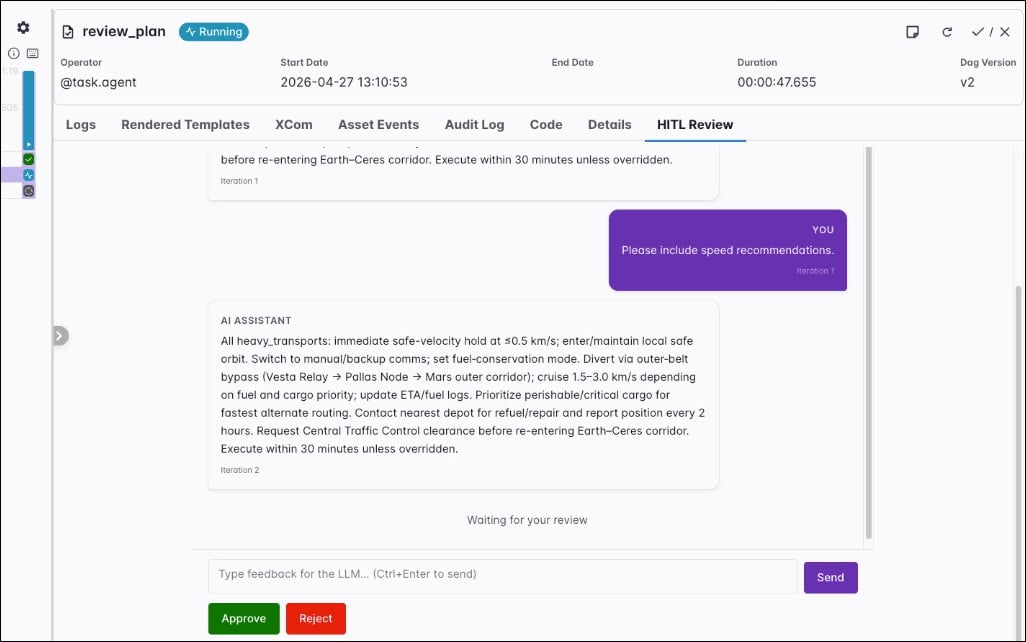
hitl_timeout parameter provides an optional time limit for the entire HITL review phase, that is, all review rounds combined. When that limit is exceeded, the task fails. The hitl_poll_interval parameter is the number of seconds to wait between polls for the reviewer action on the human-action XCom key.
Durable execution
Thedurable parameter allows you to enable step-level caching of model responses and tool results. When a task is retried, steps that have already finished don’t run again; the task reads their results from the cache instead. See Durable execution and the task state store for the concept and the Airflow feature behind it.
In Airflow 3.3 and later, the cache uses the task state store and needs no configuration other than setting durable=True.
To run an agent in durable mode set durable=True.
- Give every
FunctionToolset,MCPToolset, andDynamicToolseta uniqueid, for exampleFunctionToolset(..., id="orders"). Without it, the operator raises aValueErrorwhen it is created. - Tool results need to serialize to JSON. A result that doesn’t serialize fails the task.
- Replayed tool calls don’t run again, but a tool that failed before its result was recorded does. Make tools idempotent.
- Steps replayed from the cache don’t count toward
usage_limitsor theusageXCom. - You can use
durable=Trueonly ifenable_hitl_review=False, tool approval isn’t in use, and the agent has noSandboxToolset.
Configure the durable cache in Airflow 3.2 and earlier
In Airflow 3.2 and earlier, to enable durable mode you need to set theAIRFLOW__COMMON_AI__DURABLE_CACHE_PATH environment variable to the path where the cache will be stored. The destination can be a local temporary directory on the worker or remote object storage like S3 or GCS. After successful task execution the cache is deleted.
Output type
Passoutput_type to set the format of the agent output. It can be a primitive type like str, int, float, bool, or a subclass of Pydantic BaseModel for more complex structured outputs. Use the Field class to add descriptions to the fields for the agent to use.
MyOutputClass as the output_type parameter the agentic task will always produce a JSON output with the fields and their values.
MyOutputClass instance to XCom, and downstream tasks can type-hint the class and use attribute access. Define the class at module scope. On earlier Airflow versions, the task pushes a dict. Set serialize_output=True to push a dict on every Airflow version. A task in a different Dag that pulls the XCom needs the qualified class name in [core] allowed_deserialization_classes.
@task.llm
The @task.llm decorator and LLMOperator make a single turn LLM call and return the model output. The call doesn’t run tools. To give a model tools, use @task.agent.
@task.llm callable returns is the user prompt sent to the model. When you use LLMOperator directly, the prompt argument is required.
Optional parameters:
model_id: Overrides the model in the connectionextra(format:<provider>:<model>).fallback_conn_ids: Connections to fail over to, in order, when the model provider fails. See Fail over between model providers.system_prompt: System instructions loaded before the user prompt.output_type: Return type for the run. Defaults tostr. For structured JSON, set a subclass of PydanticBaseModel, see Output type.model_settings: PydanticAIModelSettingsfor the call, such astemperatureortimeout. See themodel_settingsentry in the PydanticAI agent parameters.output_retries: How many times the model can retry when its output fails validation againstoutput_type.usage_limits: Limits on requests, tokens, and estimated cost for the task.require_approval: WhenTrue, the task pauses after generation until a human approves or rejects through the approval UI. Needs Airflow 3.1+. Defaults toFalse.approval_timeout: Time limit to wait for a review whenrequire_approvalisTrue. Defaults toNone, which waits indefinitely.on_approval_timeout: What happens whenapproval_timeoutexpires:"fail"(default) fails the task,"approve"approves the output, and"reject"rejects it. A rejection fails the task. Needs a positiveapproval_timeout.allow_modifications: WhenTruewith approval enabled, the reviewer can edit the generated text before approval; that edited value becomes the task result. The provider converts the edit back tooutput_type. An edit that doesn’t validate fails the task withReviewedOutputValidationError. Useoutput_type=strif the reviewer enters free text. Defaults toFalse.approval_notifiersandapproval_assigned_users: Notifiers to call when a review opens, and the users who can review. By default, anyone with permission can review.serialize_output: WhenTrueandoutput_typeis a subclass ofBaseModel, the task pushes adictto XCom instead of the model instance. Defaults toFalse.decision_policy: An experimental confidence gate, for exampleDecisionPolicy(min_confidence=0.7, on_uncertain="review"). When the model reports a confidence below the bar, the task opens an approval review ("review", default) or raisesLowConfidenceError("fail"). The policy needs a decision model that reports confidence, for example a model from thetypesafeextra. A text model reports no confidence, so the policy treats its answers as uncertain. ImportDecisionPolicyfromairflow.providers.common.ai.policies.decision.
require_approval is True, the task pauses after the model returns its output. On Airflow 3.3 and later, the task enters the awaiting_input state and doesn’t hold a worker slot. On Airflow 3.1 and 3.2, the task defers and needs a running triggerer. In the Airflow UI, open the task instance, select the Required Action tab, read the generated text, edit the output if needed, and then click Approve or Reject. You can also find all pending reviews under Browse > Required Actions.
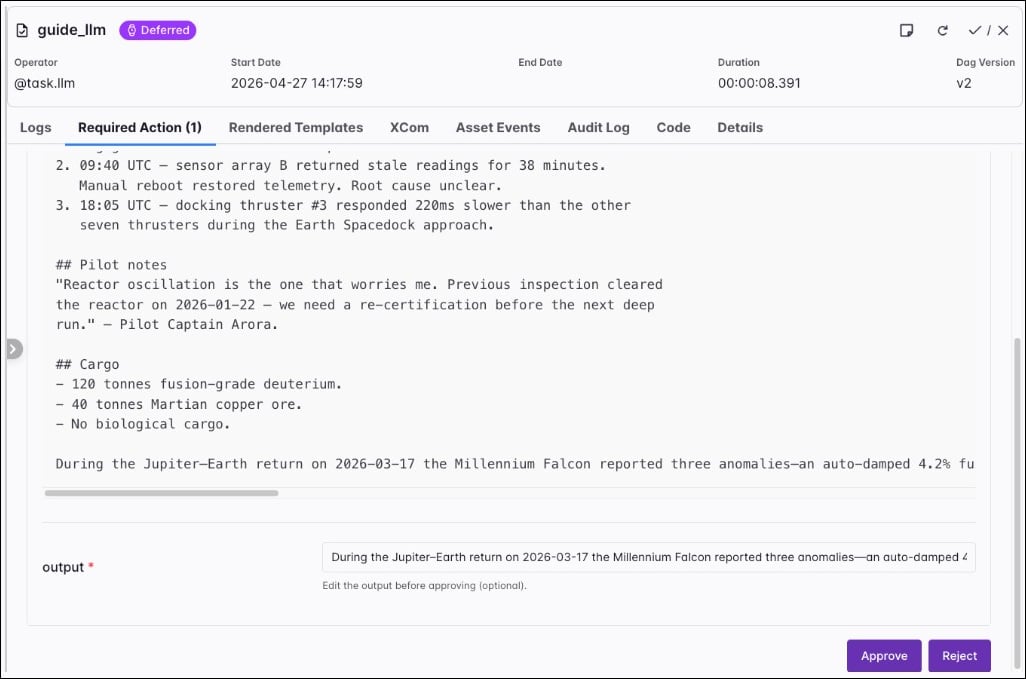
Human-in-the-loop review behaves differently for
@task.llm and @task.agent. With @task.llm, the task pauses after generation until a human approves or rejects through the approval UI. There is only one approval step, and the reviewer can edit the model output before approval when allow_modifications is True. With @task.agent and enable_hitl_review=True, the task doesn’t pause; it keeps running after output generation and waits on the HITL Review tab for approval, rejection, or feedback that triggers another iteration. Use max_hitl_iterations to cap how many review rounds run. To approve individual tool calls of an agent, see Approve tool calls.@task.llm_sql
The @task.llm_sql decorator and LLMSQLQueryOperator turn natural language into SQL. The operator can pull table metadata through a DbApiHook from db_conn_id, or you can supply a full schema string yourself. It generates SQL only; it doesn’t run queries. Downstream tasks (for example SQLExecuteQueryOperator) can execute the string returned in XCom.
prompt that describes the query you want. When you use LLMSQLQueryOperator directly, pass that text with the prompt argument. You must set llm_conn_id to the PydanticAI connection.
Additional parameters:
db_conn_id: Airflow connection used to access metadata about your database. The hook must be aDbApiHook. Omit when you fully describe the schema withschema_context.table_names: List of table names to include when accessing the database withdb_conn_id.schema_context: Free-form schema description. When you set this, the operator doesn’t access the database for metadata.validate_sql: WhenTrue(default), generated SQL is checked with sqlglot before the task finishes.allowed_sql_types: Tuple of allowed statement roots (defaults to read-only shapes such asSelect,Union,Intersect, andExceptin sqlglot). Be careful when adding writing statements likeInsert,Update, orDelete.dialect: sqlglot dialect name (for examplepostgres,mysql). WhenNone, the operator tries to infer it from the database hook.datasource_config: Optional extra configuration for the data source side of generation (see the provider source for structure when you need it).
LLMOperator (model_id, system_prompt, model_settings, usage_limits, require_approval, approval_timeout, on_approval_timeout, allow_modifications) behave like they do for @task.llm. The operator produces a fixed output, so passing output_type raises a TypeError. When require_approval is True and allow_modifications is True, a reviewer can edit the generated SQL; the provider re-validates edited SQL against the allowed_sql_types rules before returning it.
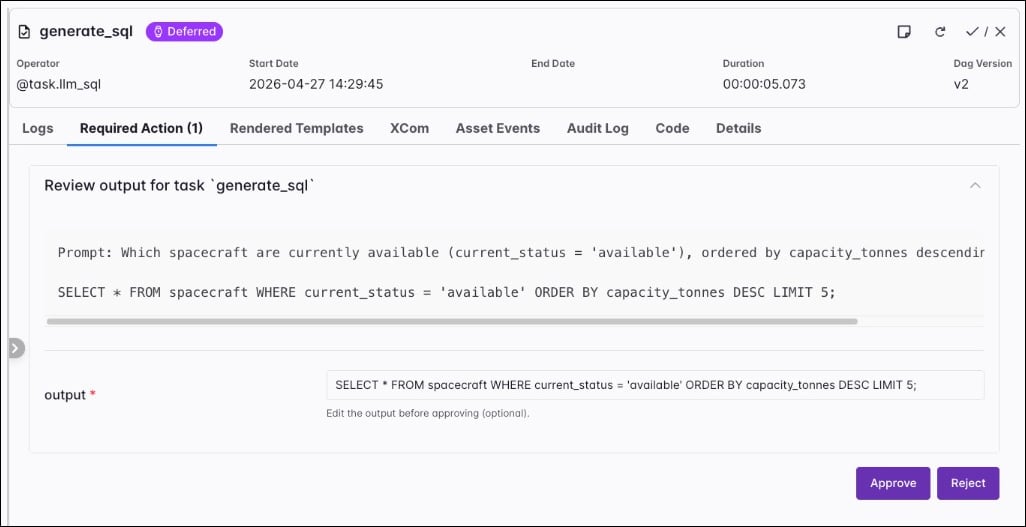
@task.llm_branch
The @task.llm_branch decorator and LLMBranchOperator extend the LLMOperator with branching. At run time the operator reads downstream task IDs from the Dag, exposes them to the model as a constrained Enum through PydanticAI structured output, and skips tasks the model doesn’t select. Note that you need to create a dependency between the branch task and its downstream candidates.
prompt. When you use LLMBranchOperator directly, pass that text with the prompt argument. Set llm_conn_id to the PydanticAI connection. Additionally, you can set allow_multiple_branches to True to allow the model to return multiple downstream task IDs.
The following parameters are specific to @task.llm_branch:
branches: A mapping of downstream task IDs to a description string, or to aBranchOption(importable fromairflow.providers.common.ai.operators.llm_branch). The model reads the description next to the option. A key that isn’t a downstream task ID fails the task before the model call.fail_on_reject: WhenTrue, a rejected review fails the task. By default, a rejected review skips the direct downstream tasks, except teardown tasks. Defaults toFalse.ignore_downstream_trigger_rules: WhenTrue, a rejected review skips every downstream task instead of only the direct ones, regardless of their trigger rules. Defaults toFalse.
LLMOperator (model_id, system_prompt, model_settings, decision_policy, and the same optional human-in-the-loop approval fields as @task.llm) behave the same way as for a plain LLM task. The operator produces a fixed output, so passing output_type raises a TypeError. The operator also pushes a decision XCom next to the return value, with the model’s pick and, when the model reports them, the confidence and probabilities.
@task.llm_file_analysis
The @task.llm_file_analysis decorator and LLMFileAnalysisOperator analyze one file, a prefix, or a small set of files through a single LLM call. The operator resolves file_path with ObjectStoragePath, normalizes supported formats into text context, and optionally attaches PNG, JPG, or PDF inputs as multimodal payloads when multi_modal=True. For object storage URIs you can embed the connection ID in the path (for example s3://<conn_id>@my-bucket/prefix/) or set file_conn_id separately.
prompt. When you use LLMFileAnalysisOperator directly, pass that text with the prompt argument.
Additional parameters:
file_path: File or prefix to analyze (local paths or object storage paths supported by Airflow object storage).file_conn_id: Optional Airflow connection for the storage backend when it isn’t embedded infile_path.multi_modal: WhenTrue, PNG, JPG, JPEG, and PDF inputs can be sent as binary attachments; requires a multimodal-capable model.max_files,max_file_size_bytes,max_total_size_bytes,max_text_chars,sample_rows: Guardrails for listing, reading, and how much normalized text or row samples reach the model. Extra files under a large prefix are omitted and the operator notes that in the prompt context.
@task.llm_schema_compare
The @task.llm_schema_compare decorator and LLMSchemaCompareOperator read schema metadata from two or more systems and ask an LLM to flag differences. The task result is a dict SchemaCompareResult with fields such as compatible, mismatches, and summary. Each entry in mismatches is a SchemaMismatch with severity, column, types, and suggested actions.
You can supply databases in two ways:
db_conn_idstogether withtable_names: shorthand to compare the same logical table across connections. Each connection must resolve to aDbApiHook.data_sources: a list ofDataSourceConfigobjects for more complex setups (for example object storage or catalog-backed sources combined withdb_conn_ids).
prompt. When you use LLMSchemaCompareOperator directly, pass that text with the prompt argument.
Additional parameters:
db_conn_idsandtable_names: Use together for the same table name across multiple database connections.data_sources: Optional list ofDataSourceConfigfor mixed database and object storage comparisons.context_strategy:"basic"sends column names and types only;"full"(default) adds primary keys, foreign keys, and indexes to the context sent to the model.system_prompt: The operator ships a default prompt that encodes cross-system type rules and severity levels. If you setsystem_promptto any string, it replaces that default; importDEFAULT_SYSTEM_PROMPTand concatenate when you want to extend rather than replace.
LLMOperator (model_id, model_settings, and optional approval fields) match @task.llm. The operator produces a fixed output, so passing output_type raises a TypeError. Downstream tasks can branch on comparison_result["compatible"] or inspect mismatches as shown in the Airflow documentation.
@task.llm_batch
The @task.llm_batch decorator and LLMBatchOperator submit many prompts as one provider batch job. The operator uses the OpenAI or Anthropic batch API, depending on the prefix of model_id. Use it for large volumes of prompts that don’t need an immediate answer. Batch APIs are typically priced lower than synchronous calls, check the pricing of your model provider.
The decorated function returns the inputs of the batch, not a single prompt. The operator writes the results as JSONL files to result_path on object storage. They don’t go to XCom. The XCom value is a small manifest that describes where the results are and how many requests ended in each outcome.
@task.llm_batch:
result_path: A directory URI where the operator writes the JSONL results and its internal state. It needs to render to the same value on every attempt.max_tokens: The output token limit for requests that don’t set their own.request_params: Extra body parameters merged into every request, for example{"temperature": 0.2}. Templated.poll_intervalandtimeout: Seconds between status checks (minimum 30) and the maximum wait for the batch from submission. The timeout defaults to 24 hours.deferrable: Runs the task in deferrable mode, which frees the worker slot while the batch runs.cancel_on_killandcancel_on_timeout: Whether to cancel the batch when the task is killed or when the timeout expires. Both default toTrue.fail_on_partial_error: WhenTrue, the task fails if any request errored, failed output validation, expired, or is missing from the results. By default, the task succeeds and the manifest counts each outcome.
usage_limits.
Limit usage
Useusage_limits to stop a task that uses more model requests, tokens, tool calls, or money than you expect. The parameter is available on @task.agent and on every @task.llm* decorator except @task.llm_batch. It takes a PydanticAI UsageLimits object, or a dict with the same fields.
UsageLimitExceeded error. Keep the following in mind:
cost_limitis an estimate that the operator checks after each model response, so the last response can exceed it. It isn’t enforced for models that PydanticAI can’t price, for example local models, and it doesn’t include sandbox compute.- If you don’t set
usage_limits, PydanticAI applies its default limit of 50 requests per run. - On Airflow 3.3 and later, the limits count across every attempt of the task instance, including retries and human-in-the-loop regenerations, as one running total. This includes the default of 50 requests when you set
usage_limits. To keep the previous per-attempt headroom, multiply each limit byretries + 1, or setusage_limits=None. On earlier Airflow versions, or whenusage_limitsisNone, each attempt counts on its own. - Steps that durable execution replays don’t count.
Fail over between model providers
Setfallback_conn_ids to let a task continue on another model provider when the first one fails, for example during an outage. The operator tries the connections in order within the same task attempt, and the next provider continues from the message history of the run so far. You can set the list in the extra field of the connection:
fallback_conn_ids to @task.agent and to every @task.llm* decorator except @task.llm_batch. A value set on the task overrides the connection, and an empty list [] turns the chain off.
Keep the following in mind:
- After every connection in the chain fails, the task raises a
pydantic_ai.exceptions.FallbackExceptionGroupinstead of the exception of the last provider. A retry rule that matchesModelHTTPErrorstops matching, so matchFallbackExceptionGroupas well. - Every call tries the primary connection first. The operator has no circuit breaker.
- A fallback connection can’t have a
fallback_conn_idslist of its own. - A request with a malformed prompt walks the whole chain, because the provider rejects it on every connection.
Retry policies
Retry policies determine whether and when Airflow retries a failed task, based on the exception. They need Airflow 3.3 or later. Attach a policy to a task with theretry_policy parameter of @task.
Start with deterministic rules, which don’t call a model. Use LLMRetryPolicy for failures you can’t list in advance. It sends the exception class and message to a model on every failure, and the model classifies the failure and suggests whether to retry and how long to wait. The fallback_rules apply only when the classification call itself fails.
ClassifierRetryPolicy is a second policy that asks the model to choose from a fixed set of error categories, for example rate_limit, network, and auth, each with its own retry action and delay.
Keep the following in mind:
- The delay that the model suggests overrides the
retry_delayof the task. - The classification call is a separate model request that isn’t subject to the
usage_limitsof the task. - The policy masks secrets in the exception text before it goes to the model provider, and you can shorten the text with
max_exception_length. Setinclude_traceback=Trueto include a traceback. - The policy writes its decision to the
retry_reasonof the task instance.